

 WooCommerce & Shopify
See where every order's money went.
Razorpay reconciliation for Shopify and WooCommerce
Know what you should receive from your payment gateway. Spot missing payments, unexpected fees, and refund mismatches. Compare your store orders against payment records to keep your books accurate.
Why store revenue goes missing before reaching your bank
Store platforms record customer orders. Payment gateways send lump-sum bank deposits. In between, hidden fee deductions, delayed updates, and refund adjustments make manual matching difficult.
Manual checking creates blind spots
Store dashboards show total sales, but your bank account receives lumped batches. Finding discrepancies by hand takes hours and leads to mistakes:
- Unexpected Fee Deductions: Gateways take fees and tax from every deposit. Fee overcharges beyond your agreed schedule are hard to catch by hand. (Fees depend on your Razorpay agreement and payment method.)
- Refund Deductions: Customer refunds are deducted from future deposits, creating adjustments that can confuse simple sales reports.
- Delayed Store Updates: Notification delays sometimes prevent payment numbers from saving to store orders, leaving orders looking unpaid.
- Delayed Deposits: Transactions can slip past normal transfer windows without anyone noticing.
Clear rules replace manual guesswork
Works from exported files from your store and Razorpay to replace manual spreadsheets with rule-based matching. It evaluates order totals, deductions, and transfer references:
- File-Based Intake: Works from exported files from your store and Razorpay without requiring direct database access.
- Clear Business Rules: Uses straightforward math and logic without black-box machine learning or guesswork.
- Independent Fee Checks: Checks fee deductions against your agreed schedule (fees depend on your Razorpay agreement and payment method).
- Clear Action Items: Highlights differences clearly so your team can resolve billing issues with payment references in hand.
Three simple steps to match your records
No machine learning or guessing. Every transaction is matched using clear business rules.
1. Export your records
Download order files from your WooCommerce or Shopify admin. Download settlement files from your Razorpay dashboard.
2. Compare payments
We compare each order with gateway transactions. Our checks verify order totals, deductions, and fee percentages.
3. Review findings
Receive a plain summary of matched deposits. Review flagged differences and clear steps to resolve any missing funds.
What you give us and what you get back
Simple file intake with zero software installation required on your store.
Simple files from your dashboards
- Store Order Export: Order CSV files from your WooCommerce or Shopify store admin.
- Razorpay Settlement Export: Settlement CSV files downloaded directly from your Razorpay dashboard.
- Your Rate Schedule: The fee percentage and fixed fee per transaction from your merchant agreement.
Clear, actionable audit results
- Matched Deposit Summary: A clear summary linking each order to its bank transfer reference.
- Fee Difference Report: A highlighted list of gateway fee deductions that exceeded your agreed rate.
- Pending & Refund List: A breakdown of in-flight deposits, customer returns, and flagged orders.
- Accountant-Ready Format: Structured spreadsheets ready for your finance team or bookkeeping software.
Fair pricing with direct setup support
Choose between running the tool on your own machine or letting us manage the comparisons for you.
What happens next
1. Message us on WhatsApp to discuss your store platform and order volume.
2. We confirm compatibility and provide instructions for exporting your files.
3. You receive matched results and an audit report within 2 business days.
Explore sample matching results
Inspect sample output tested on our own WooCommerce and Shopify demo stores. Filter by fee differences, refunds, or flagged records to see the engine in action.
| Order # | Store Total | Matching Status | Settled / Bank Ref | Fee Check (Agreed Fees + GST) | Net Amount | Operator Diagnosis & Action |
|---|---|---|---|---|---|---|
| #28 2026-10-16 | ₹500.00 | DIRECT MATCH pay_Tnj8KTRc1AoMzn | SETTLED Ref: CMS38891049210 | DISCREPANCY Overcharge: +₹14.16 | ₹474.04 | Fee overcharge detected: gateway fee+tax exceeds agreed fee schedule (configured according to your Razorpay agreement and payment method) by ₹14.16. Action Required: Raise billing query with payment gateway referencing bank reference CMS38891049210. |
| #26 2026-10-16 | ₹700.00 | DIRECT MATCH pay_Tnigkd6IasxMEx | SETTLED Ref: CMS38891049210 | ✓ Fee Checked Fee: ₹16.52 | ₹683.48 | Matched directly via gateway payment reference (pay_Tnigkd6IasxMEx). Expected fee checked. None: Transfer matched and fee checked. |
| #27 2026-10-16 | ₹700.00 | ORDER NOTE pay_Tnj2Ab99XkL0mn | SETTLED Ref: CMS38891049210 | ✓ Fee Checked Fee: ₹16.52 | ₹683.48 | Backup match: matched via order reference in payment notes. Payment reference was blank in store record. Review store plugin: verify payment reference is saved to store orders reliably. |
| #25 2026-10-16 | ₹500.00 | DIRECT MATCH pay_Tnj8KTRc1AoMzn | SETTLED Ref: CMS38891049210 | ✓ Fee Checked Fee: ₹11.80 | ₹488.20 | Matched directly via gateway payment reference. Expected fee checked. None: Transfer matched and fee checked. |
| #23 2026-10-16 | ₹700.00 | DIRECT MATCH pay_TniU8xL18eK21a | SETTLED Ref: CMS38891049210 | N/A | ₹0.00 Ref: ₹700.00 (Full) | Full refund of ₹700.00 deducted by gateway. Net balance zeroed (₹0.00). None: Full refund cycle completed in settlement records. |
| #21 2026-10-16 | ₹500.00 | DIRECT MATCH pay_Tni97JqQfO4WqE | SETTLED Ref: CMS38891049210 | ✓ Fee Checked Fee: ₹11.80 | ₹390.56 Ref: ₹100.00 (Partial) | Partial refund of ₹100.00 deducted from transfer. Net transfer amount credited: ₹390.56. Verify customer partial return / refund request. |
| #29 2026-10-16 | ₹500.00 | UNMATCHED N/A | In-Flight (T+2 Days) | N/A | ₹0.00 | Order created within typical gateway transfer window (T+2 business days). No deposit record found yet. In-flight: Check payment status on next scheduled run. |
Frequently asked questions
How does this tool match my store orders with Razorpay?
It compares order numbers, payment references, and payment amounts from your store export against Razorpay settlement files. It uses exact matching rules to pair transactions without guessing.
Do I need to give you my store passwords or login credentials?
No. This service works from exported CSV files from your store and Razorpay. We do not need your store admin password or your payment gateway login.
How does it detect fee overcharges?
It calculates the expected gateway fee and tax for each transaction using your agreed rate schedule. If the gateway deducted more than allowed, it flags the difference for review. (Fees depend on your Razorpay agreement and payment method.)
How are customer refunds handled?
Full and partial refunds are matched to their original order numbers and deducted from deposit totals. Full refunds show a net balance of zero so your sales numbers stay accurate.
Does this prove that money has reached my bank account?
No. It shows that Razorpay reported a transfer. Only your official bank statement confirms that funds have cleared into your bank account.
Can I run this matching software on my own computer?
Yes. If you choose our self-hosted option, you receive the full Python source code to run on your own computer or server.
Other business automations
Explore our full library of business automations or check out our website monitoring service.
M06: Website Uptime & Security Monitor
Monitor websites, response times, and certificate expiry. Get immediate alerts in Telegram when an issue occurs.
View M06 Workflow →All Workflows & Automations
View our complete catalogue of business automations, available for self-hosting or managed hosting.
Back to Catalogue →View Technical Details & Specifications
We show that a payout was reported by the gateway. We don't claim it reached your bank until a bank statement confirms it.
Many tools claim an order is “settled in your bank” the moment a payment gateway generates a payout record or UTR. Sanocea maintains strict financial accuracy: gateway reports prove payout remittance was initiated by the gateway, not that money has cleared into your bank account.
Store Order Matched
The store order is linked to a valid gateway payment transaction ID (pay_*) via direct matching or reviewed backup notes.
Gateway Payout Matched
The gateway grouped the transaction into a payout report with a Settlement ID and bank transfer reference (UTR). Funds are reported in transit from gateway to bank.
Bank Statement Credit Matching
Future capability: matching the UTR against your bank statement credit line items to confirm cleared funds.
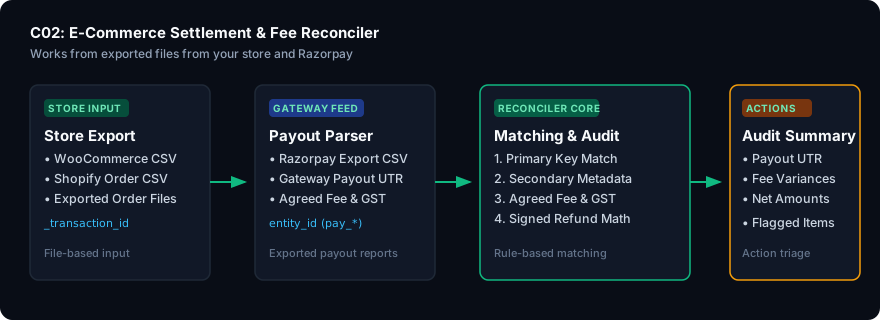
Financial Reconciliation Architecture Pipeline
Platform-Neutral Core · Tested on our own WooCommerce and Shopify demo stores
Included Deliverable Files
connect/service.py— Managed reconciliation daemon with graceful shutdown and health monitoringconnect/vault.py— AES-256-GCM credential vault with single-use intake tokensconnect/tenant_manager.py— Multi-tenant isolated workspace manager with cryptographic audit ledgerconnect/reconciler_service.py— Multi-currency integer-subunit 4-dimensional reconciliation engineconnect/notifier.py— Telegram alert dispatcher with 4-hour deduplication suppression
Technical Specifications & Operating Boundaries
Execution Runtime & Storage
Standard Python 3.10+ runtime. Operates directly on local CSV files using integer subunit math (paisa / cents) to prevent floating-point rounding errors.
Credential Security
Encrypted with AES-256-GCM authenticated cipher. Master key stored in server credential vault with 0600 file permissions.
Operating Boundaries
Tested on our own WooCommerce and Shopify demo stores. Read-only intake performs zero database writes to store orders or gateway balances. No 24/7 uptime SLA is provided.
Reconciliation Methodology
Deterministic 4-phase rule matching: direct transaction ID pairing, secondary metadata fallback, fee schedule tolerance auditing, and signed refund reconciliation.
Ready to find missing payments and fee differences?
See how our service matches your store orders with payment records. Chat with us on WhatsApp to discuss access for your store.
Controlled Beta — Join the pilot to simplify e-commerce settlement. Contact us on WhatsApp to discuss access. Works from exported files from your store and Razorpay. Tested on our own WooCommerce and Shopify demo stores.