
SNC-WF-009 · Free Tier · Logistics & NDR Analytics

Cluster Courier NDR Remarks & Stop Return-to-Origin Dead Freight Losses

SNC-WF-009 · RTO Reason Analytics & Cluster Report (Free Tier)

A free, self-hosted Python tool that ingests courier Non-Delivery Reports (NDRs), categorizes free-text rider remarks into 6 deterministic root causes (fake attempts, doorstep refusals, address defects, unreachables, delays), quantifies the exact financial loss from forward and reverse freight, and produces actionable operational remediations for carrier penalty disputes.

PRODUCT SUMMARY AT A GLANCESNC-WF-009
Primary OutcomeClusters noisy courier NDR remarks, isolates suspected fake attempts, quantifies forward/reverse dead freight, and reveals high-risk PIN zones.
How It RunsSelf-Hosted Python 3.8+ (Runs on your own computer or server)
Setup ExpectationsFree to self-host on your own hardware. Free workflows never run on Sanocea infrastructure. Optional assisted setup: ₹500 one-time.
Verification StatusCode & Logic Tested: Tested on courier fake attempt, address defect, and doorstep refusal datasets with 100% test pass rate
The 3-Step Process in Simple English
1. Input

Daily or weekly courier NDR export CSV.

2. Transformation

Applies deterministic regex rules to normalize messy remark strings into 6 root causes, sums two-way dead freight losses, and ranks couriers and PIN zones.

3. Output

Executive summary report and segregated CSVs for cluster metrics and classified consignment events.

Free to self-host. Want Sanocea to set it up? ₹500 one-time.

Setup scope covers installation on customer-controlled infrastructure, configuration of authorised integrations, functional testing and handover.

Hosting, third-party charges and ongoing support are excluded unless separately agreed. Free workflows must never run on Sanocea-hosted infrastructure.

Direct Download or Assisted Setup: Download the free toolkit below, or contact engineering on WhatsApp for ₹500 assisted setup on your machine.

What Goes Wrong in an Ordinary Working Day

Indian D2C brands lose ₹130 to ₹220 per RTO consignment in dead courier freight. Courier remark logs are messy free-text strings like "customer not available" or "rider did not visit", leaving brands unable to distinguish courier fraud from customer refusal.

The Impact on Your Business & Customers

If 30% of your RTOs are caused by delivery executives failing to attempt delivery or call the buyer, you are paying courier penalties for their failure. Clustering NDR remarks gives you the hard proof needed to hold couriers accountable and reduce avoidable RTOs.

What This Tool Does & What Changes for You

Parses your courier NDR export CSV, applies pattern-matching rules to classify each failure, aggregates dead freight losses across couriers, postal circles, and SKUs, and writes out classified CSVs and an executive insights summary.

What Changes in Practice:

Your logistics team has immediate proof of which couriers fabricate delivery attempts and which postal zones require pre-dispatch phone verification before printing shipping labels.

Concrete Before & After Example (Actual Code Output)

Demonstrates how messy courier non-delivery remarks are clustered into actionable root causes.

INPUT: Raw Courier NDR Log EntryInput File
AWB: AWB-5001\nCourier: Delhivery\nPayment: COD\nRemark: "fake attempt rider did not visit location"\nFwd Freight: ₹65\nRev Freight: ₹75
OUTPUT: Normalized Root-Cause & Financial Auditnormalized_inventory.csv
Cluster: COURIER_FAKE_ATTEMPT\nSuspected Fake Attempt: TRUE\nDead Freight Bleed: ₹140.00\nAction: FILE_CARRIER_SLA_DISPUTE_REIMBURSEMENT

Consignment flagged for 3PL SLA penalty reimbursement claim.

What Changed vs. What Remained Unchanged

✓ What Changed (Normalized):
  • Grouped unstructured remarks into 6 standardized root-cause clusters
  • Quantified forward + reverse dead freight waste across couriers and postal zones
  • Isolated unattempted deliveries for carrier penalty recovery
ℹ What Remained Unchanged:
  • Original courier NDR CSVs remain untouched on your machine
  • Zero PII or order logs transmitted externally

What You Need Before Getting Started

  • Courier NDR or RTO export CSV (from Shiprocket, Delhivery, Bluedart, or custom OMS).
  • Python 3.8+ on any computer or server.

Technical Setup Guidance:

Setup Difficulty & Expected Time

Step-by-Step Run Instructions (Zero-Code Terminal Run)

  1. Download and extract snc-wf-009-rto-analytics.zip.
  2. Place your courier NDR export in ndr_manifest.csv.
  3. Run: python3 rto_analytics.py analyze ndr_manifest.csv --clusters-out clusters.csv --events-out events.csv.
  4. Review clusters.csv to identify failing couriers and claim fake attempt reimbursements.

What You Receive in the Download Archive

Every deliverable is clean, self-contained, and ready for immediate deployment. You receive the complete files, configuration templates, setup guides, and automated tests.

File NameDeliverable Description
rto_analytics.pyStandalone Python 3.8+ RTO reason clustering and loss analytics engine
README.mdSetup guide, clustering taxonomy, and operational boundaries
SETUP.mdQuickstart execution and weekly cron guide
COSTS.mdZero-cost operating disclosure
LICENSING.mdSanocea Open Workflow License (MIT Compatible)
fixtures/ndr_courier_log.csvBenchmark courier fake attempt NDR dataset
fixtures/ndr_address_defects.csvBenchmark address defect NDR dataset
fixtures/ndr_refusals.csvBenchmark doorstep refusal NDR dataset
fixtures/sample_ndr_manifest.csv10-consignment comprehensive mixed benchmark dataset
tests/test_rto_analytics.pyAutomated test suite verifying classification and loss arithmetic

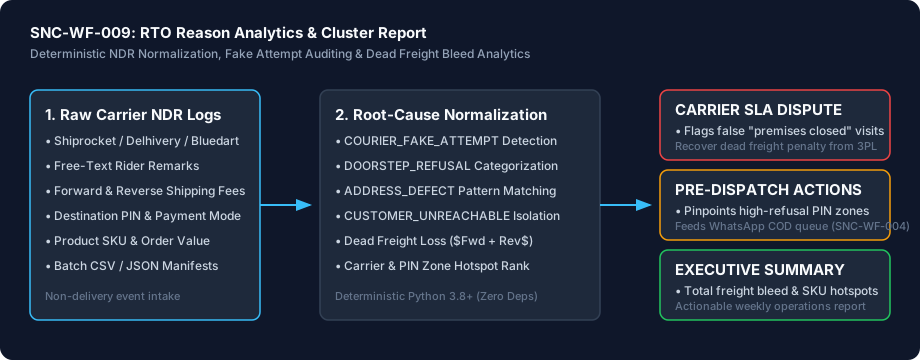
Architecture Diagram & Tested Capabilities

For technical teams or developers assisting your business, below is the visual execution architecture and automated verification breakdown:

Cluster Courier NDR Remarks & Stop Return-to-Origin Dead Freight Losses Architecture Pipeline Diagram
⚡Deterministic execution flow: runs on your own compute without telemetry tracking.

Verification Disclosure

Pure Python 3.8+ standard library script. Regex clustering across 6 root causes, forward/reverse dead freight calculation, carrier SLA dispute reporting, and multi-tier CSV export. 9/9 tests passing.

Deterministic NDR Root-Cause Clustering

Classifies free-text remarks into 6 operational categories with zero ambiguity.

Fully Tested

Carrier Fake Attempt Auditing

Identifies unattempted deliveries and false "premises closed" remarks for SLA claims.

Fully Tested

Dead Freight Bleed Quantification

Calculates forward + reverse shipping fees wasted on each undelivered consignment.

Fully Tested

Courier Performance Disparity Ranking

Compares delivery failure rates and fake attempt incidents across 3PL partners.

Fully Tested

Regional & SKU Hotspot Detection

Pinpoints high-RTO postal circles and product lines suffering elevated doorstep refusal.

Fully Tested

Documented Limitations & Third-Party Costs

We believe in complete transparency. Review the documented technical boundaries and external service fee breakdown below prior to obtaining the package:

⚠️Documented Boundaries & Considerations

  • Historical Manifest Analytics: Analyzes carrier NDR logs and remarks; does not override courier dispatch state in real-time.
  • Customer-Controlled Infrastructure: Runs locally on your machine or server; does not transmit order data to Sanocea.
  • Offline Rules Engine: Operates offline without querying paid third-party APIs.
ComponentEstimated CostDetails & Free Tier Allowances
RTO Reason Analytics Toolkit₹0 (Free to self-host)Download full source code and self-host
Optional Assisted Setup₹500 one-timeAssisted installation, environment setup, and handover
Third-Party Services₹0 additionalRuns offline with zero external API fees

Platform Compatibility & Technical Specifications

Operating System
Linux, macOS, Windows
Runtime / Python
Python 3.8+
Supported Platforms
Shiprocket, Delhivery, Bluedart, Shadowfax, XpressBees
Required Inputs
  • NDR/RTO CSV containing AWB, order ID, courier, payment mode, SKU, PIN code, and free-text courier remark
Generated Outputs
  • rto_clusters.csv summarizing incident counts, freight loss, and merchandise bleed per cluster
  • rto_events.csv containing normalized root-cause classifications and fake attempt flags for every consignment
Free Self-Hosted SoftwareInstant Download · Optional ₹500 Setup

Download or Set Up SNC-WF-009

Receive the complete distributable archive containing rto_analytics.py, step-by-step setup guides, mock fixtures, and automated test suites.

Free to self-host. Want Sanocea to set it up? ₹500 one-time.

Setup scope covers installation on customer-controlled infrastructure, configuration of authorised integrations, functional testing and handover.

Hosting, third-party charges and ongoing support are excluded unless separately agreed. Free workflows must never run on Sanocea-hosted infrastructure.

Download Free Package (.zip)Chat on WhatsAppWe reply within 2 business days (Monday to Saturday, 9:00 AM to 9:00 PM IST)

Frequently Asked Questions

How does the tool identify suspected carrier fake attempts?

It scans courier remark strings for patterns indicating unattempted drop-offs (e.g. "rider did not visit", "premises closed" with no customer call log, or instant status updates). These flagged consignments provide supporting evidence when disputing SLA breach penalties with couriers.

Does this workflow integrate with our live courier APIs in real-time?

No. This is a local-first offline analytics engine that ingests daily or weekly NDR CSV/JSON exports from your courier portals, ensuring 100% data privacy and zero API overhead.

How does it compute dead freight loss?

It sums the forward shipping freight charged on the outbound journey plus the reverse shipping fee charged by the courier to return the parcel to your fulfillment warehouse.

RTO Reason Analytics: Clustering Courier NDRs and Stopping Return Freight Bleed

How Indian e-commerce merchants cluster unstructured courier NDR remarks, identify carrier fake attempts, detect high-RTO PIN zones, and quantify dead freight loss.

Read Field Guide on Sanocea Insights →

Explore Related Self-Hosted Tools

SNC-WF-004Self-Hosted Python 3.8+

Prioritize and Triage Cash-on-Delivery Orders Before Dispatch

COD Confirmation Work Queue & Risk Filter (Free Tier)

A free, self-hosted Python tool that ingests Cash-on-Delivery (COD) order CSV exports, validates essential logistics fields (10-digit phone, 6-digit PIN, valid address), and scores orders across multi-factor refusal risk heuristics (high basket value, duplicate phone bursts, sequential digits, vague addresses). It outputs a prioritized work queue categorizing orders into Auto-Approve, Manual Confirmation, High-Risk Hold, and Data Correction Required.

SNC-WF-006Self-Hosted Python 3.8+

Validate Shipping Address Data & Indian PIN Codes Before Label Creation

Shipping Label Data & PIN Code Validator (Free Tier)

A free, self-hosted Python tool that audits e-commerce shipment manifests before sending them to courier label APIs (Shiprocket, Delhivery, Bluedart, Shadowfax). It checks 6-digit Indian PIN codes against regional postal circles, auto-splits addresses exceeding 50 characters, normalizes phone numbers (+91/0 prefix), and calculates volumetric weight disparity to prevent courier billing disputes.

SNC-WF-008Self-Hosted Python 3.8+

Triage Customer Return Requests & Enforce Policy Gates Before Reverse Pickup

Return Request Intake and Triage Ledger (Free Tier)

A free, self-hosted Python tool that ingests customer return requests, validates them against your store return window and non-returnable category policies, checks for required defect proof, deduplicates repeat claims, and applies reverse freight economics to recommend either carrier reverse pickup, supervisor review, or instant store credit.