
SNC-WF-012 · Free Tier · Inventory & Stock

Get Alerted Before Fast-Selling Products Run Out of Stock

SNC-WF-012 · Low-Stock Inventory Alerter with State Deduplication (Free Tier)

A free, local Python tool that prevents unexpected stockouts on your bestsellers. It scans your inventory spreadsheet, detects items falling below safety reorder points, tracks alert history in a local SQLite database to prevent notification spam, and sends a clean Telegram briefing to your purchasing team.

PRODUCT SUMMARY AT A GLANCESNC-WF-012
Primary OutcomeMonitors warehouse inventory levels, identifies products breaching minimum stock thresholds, and dispatches deduplicated Telegram alerts.
How It RunsSelf-Hosted Python 3.8+ (Runs on your own computer or server)
Setup ExpectationsFree to self-host on your own hardware. Free workflows never run on Sanocea infrastructure. Optional assisted setup: ₹500 one-time.
Verification StatusCode & Logic Tested: Tested with SQLite transition state machine and synthetic inventory feeds
The 3-Step Process in Simple English
1. Input

inventory.csv (SKU, title, on-hand quantity, minimum threshold) and Telegram bot credentials.

2. Transformation

Local Python script compares stock against reorder points and checks SQLite alert history.

3. Output

Instant Telegram alerts (without repeat spam) and low_stock_exceptions.csv.

Free to self-host. Want Sanocea to set it up? ₹500 one-time.

Setup scope covers installation on customer-controlled infrastructure, configuration of authorised integrations, functional testing and handover.

Hosting, third-party charges and ongoing support are excluded unless separately agreed. Free workflows must never run on Sanocea-hosted infrastructure.

Direct Download or Assisted Setup: Download the free toolkit below, or contact engineering on WhatsApp for ₹500 assisted setup on your machine.

What Goes Wrong in an Ordinary Working Day

Bestselling products sell out without warning because inventory drops are only noticed when warehouse shelves are already empty or customers encounter "Sold Out" banners.

The Impact on Your Business & Customers

Every day a core product is out of stock results in lost revenue, lost search ranking momentum, and ad spend directed to dead pages.

What This Tool Does & What Changes for You

Compares current warehouse stock against defined reorder points, consults a local SQLite alert history table to suppress duplicates, and dispatches actionable Telegram alerts.

What Changes in Practice:

Your purchasing manager gets an alert days before a bestseller stockout occurs, allowing purchase orders to be placed well in advance.

Concrete Before & After Example (Actual Code Output)

Shows how depleted products are flagged for purchase reorders while avoiding repeat alert spam.

INPUT: Daily Inventory ExportInput File
sku,title,stock_qty,reorder_point
SKU-JEANS-32,Classic Denim 32,3,10
SKU-HOODIE-L,Oversized Fleece L,45,15
OUTPUT: Telegram Alert Notificationnormalized_inventory.csv
⚠️ [LOW STOCK WARNING]
Product: Classic Denim 32 (SKU-JEANS-32)
Current Stock: 3 units
Reorder Threshold: 10 units
Action: Immediate purchase reorder required to avoid stockout.

Alert sent once. SQLite tracking ensures your team isn't spammed every hour for the same item until stock levels change.

What Changed vs. What Remained Unchanged

✓ What Changed (Normalized):
  • Flagged low-stock bestseller before customers hit an "Out of Stock" button
  • Recorded alert timestamp in local SQLite database to suppress duplicate alerts
  • Generated CSV reorder manifest for supplier purchasing
ℹ What Remained Unchanged:
  • Healthy stock items (45 units > 15 threshold) ignored
  • Zero store inventory modification (read-only monitoring)

What You Need Before Getting Started

  • Store read API credentials (or CSV inventory feed).
  • Telegram bot token and chat ID (free).
  • Python 3.8+ on your computer or server.

Technical Setup Guidance: Uses local SQLite storage for state tracking. No external database servers or paid subscriptions required.

Setup Difficulty & Expected Time

Takes 5 minutes. Download the script, set your threshold, and schedule via cron.

Step-by-Step Run Instructions (Zero-Code Terminal Run)

  1. Download and unzip snc-wf-012-inventory-alerter.zip.
  2. Open config.json and enter your Telegram bot credentials.
  3. Place your daily inventory export in data/inventory.csv.
  4. Run: python3 inventory_alerter.py --inventory data/inventory.csv
  5. Review Telegram alerts and reorder necessary stock.

What You Receive in the Download Archive

Every deliverable is clean, self-contained, and ready for immediate deployment. You receive the complete files, configuration templates, setup guides, and automated tests.

File NameDeliverable Description
alerter.pyStandalone Python 3.8+ low stock alerter with SQLite deduplication
fixtures/low_stock_inventory.jsonSample inventory feed fixture with low and healthy SKUs
README.mdComplete setup, crontab scheduling, and Telegram configuration guide
SETUP.mdQuickstart guide for local execution
COSTS.mdOperating cost disclosure (₹0 ongoing fees)
LICENSING.mdSanocea Open Workflow License (MIT Compatible)
tests/test_low_stock_alerter.pyAutomated test suite verifying state machine deduplication and recovery

Architecture Diagram & Tested Capabilities

For technical teams or developers assisting your business, below is the visual execution architecture and automated verification breakdown:

Get Alerted Before Fast-Selling Products Run Out of Stock Architecture Pipeline Diagram
⚡Deterministic execution flow: runs on your own compute without telemetry tracking.

Verification Disclosure

Uses local embedded SQLite database to track alert states. Prevents notification spam when stock remains low, and auto-resets when inventory is replenished.

State-Aware Deduplication

Maintains persistent alert state in SQLite to guarantee zero notification spam.

Fully Tested

Automatic Restock Reset

Automatically clears alert flags when quantity rises above threshold.

Fully Tested

Read-Only Inventory Access

Only inspects product quantities; makes no changes to store catalogs.

Fully Tested

Documented Limitations & Third-Party Costs

We believe in complete transparency. Review the documented technical boundaries and external service fee breakdown below prior to obtaining the package:

⚠️Documented Boundaries & Considerations

  • Monitoring Only: Alerts your team to reorder stock; does not place purchase orders with suppliers automatically.
  • Deduplication Window: By default, alerts for the same SKU are suppressed for 24 hours unless quantity drops further.
ComponentEstimated CostDetails & Free Tier Allowances
Low-Stock Alerter Tool₹0 (Free to self-host)Download full source code and self-host
Optional Assisted Setup₹500 one-timeAssisted installation, Telegram bot setup, and handover
Telegram & API Fees₹0 ForeverTelegram Bot API and native store REST queries are free

Platform Compatibility & Technical Specifications

Operating System
Linux, macOS, Windows
Runtime / Python
Python 3.8+
Supported Platforms
WooCommerce, Shopify, Custom Feeds
Required Inputs
  • Store read API credentials or inventory level CSV
  • Configurable stock threshold (e.g. 5 units)
  • Telegram bot token
Generated Outputs
  • Transition-only Telegram notification on initial stockout
  • Automatic restock state reset upon replenishment
  • Current low-stock SKU inventory report
Free Self-Hosted SoftwareInstant Download · Optional ₹500 Setup

Download or Set Up SNC-WF-012

Receive the complete distributable archive containing alerter.py, step-by-step setup guides, mock fixtures, and automated test suites.

Free to self-host. Want Sanocea to set it up? ₹500 one-time.

Setup scope covers installation on customer-controlled infrastructure, configuration of authorised integrations, functional testing and handover.

Hosting, third-party charges and ongoing support are excluded unless separately agreed. Free workflows must never run on Sanocea-hosted infrastructure.

Download Free Package (.zip)Chat on WhatsAppWe reply within 2 business days (Monday to Saturday, 9:00 AM to 9:00 PM IST)

Frequently Asked Questions

What is 'transition-only' alerting?

Basic alert scripts notify your chat every 10 minutes as long as an item stays out of stock. SNC-WF-012 records the state in local SQLite and alerts you only once when the threshold is crossed, muting itself until new stock arrives.

Does it auto-reset when we restock?

Yes. When inventory quantity rises back above the threshold, the SQLite state machine resets automatically.

Can it modify our inventory quantities?

No. It is strictly read-only and never modifies stock numbers in your store.

Low-Stock Inventory Threshold Alerting: Preventing Stockouts with State Deduplication

How scheduled inventory scans cause alert fatigue through repetitive notifications, why un-deduplicated alerts get muted, and how SQLite state tracking ensures single alerts per stockout event.

Read Field Guide on Sanocea Insights →

Explore Related Self-Hosted Tools

E10Managed Service

Prevent Revenue Leaks from Broken Pricing & Catalog Errors

Store Catalogue Integrity & Discrepancy Guard

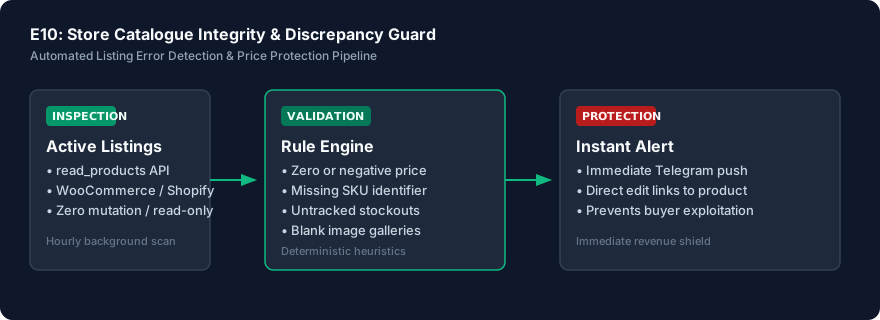
An enterprise-grade continuous catalog monitor that audits your complete online inventory 24/7 on Sanocea VPS infrastructure. It catches accidental zero prices, inverted compare-at discounts, missing barcodes, and broken image URLs within minutes of publication, notifying your operations team via Telegram before shoppers exploit errors.

SNC-WF-019Self-Hosted Python 3.8+

Catch Zero and Negative Inventory Before Multi-Channel Overselling Occurs

Multi-Channel Out-of-Stock Zero-Quantity Safety Guard (Free Tier)

A free, local Python safety tool that protects your marketplace seller ratings. It scans your product catalog or warehouse feeds, identifies zero-stock and negative-quantity variants, applies configurable safety buffers, and flags unfulfillable items so you can pause listings before marketplace cancellation penalties strike.

SNC-WF-011Python 3.10+

Reconcile Google Sheets Stock with WooCommerce Before Syncing

CSV‑only Inventory Reconciliation Preview

A local-first Python tool that prevents inventory overselling and pricing mistakes. It compares your warehouse Google Sheet against your live WooCommerce product export, generating an exact delta preview of which quantities and prices differ—allowing you to audit updates before importing them into your store.