
SNC-WF-011 · E‑commerce Inventory

Reconcile Google Sheets Stock with WooCommerce Before Syncing

SNC-WF-011 · CSV‑only Inventory Reconciliation Preview

A local-first Python tool that prevents inventory overselling and pricing mistakes. It compares your warehouse Google Sheet against your live WooCommerce product export, generating an exact delta preview of which quantities and prices differ—allowing you to audit updates before importing them into your store.

PRODUCT SUMMARY AT A GLANCESNC-WF-011
Primary OutcomeCompares Google Sheets inventory exports against WooCommerce product CSVs offline, highlighting stock discrepancies and price mismatches before you update your live store.
How It RunsRuns on any computer with Python 3.10+ (no external services required)
Setup ExpectationsFree to self-host on your own hardware. Free workflows never run on Sanocea infrastructure. Optional assisted setup: ₹500 one-time.
Verification StatusCode & Logic Tested: All tests pass in an isolated clean‑room environment.
The 3-Step Process in Simple English
1. Input

Google Sheets inventory CSV export and WooCommerce product export CSV.

2. Transformation

Local Python script aligns SKUs, calculates stock/price differences, and isolates mismatches.

3. Output

sync_preview_delta.csv (exact changes to review) and missing_skus_report.csv.

Free to self-host. Want Sanocea to set it up? ₹500 one-time.

Setup scope covers installation on customer-controlled infrastructure, configuration of authorised integrations, functional testing and handover.

Hosting, third-party charges and ongoing support are excluded unless separately agreed. Free workflows must never run on Sanocea-hosted infrastructure.

Direct Download or Assisted Setup: Download the free toolkit below, or contact engineering on WhatsApp for ₹500 assisted setup on your machine.

What Goes Wrong in an Ordinary Working Day

Warehouse teams update quantities in shared Google Sheets, but copy-pasting numbers directly into WooCommerce without verifying stock deltas leads to accidental overselling or overwriting live prices.

The Impact on Your Business & Customers

Syncing mismatched spreadsheets directly to a live store causes unfulfillable orders and incorrect customer charges.

What This Tool Does & What Changes for You

Reads your warehouse Google Sheet export and WooCommerce product CSV, aligns matching SKUs, computes quantity and price deltas, and isolates any missing items into a clean preview file.

What Changes in Practice:

You see exactly what will change before any data touches your store, eliminating blind spreadsheet imports.

Concrete Before & After Example (Actual Code Output)

Demonstrates how the delta preview isolates warehouse changes without blindly overwriting your live store.

INPUT: Google Sheet vs WooCommerce ExportInput File
[Google Sheet (Warehouse)]: SKU-101, Stock: 25, Price: 49.00
[WooCommerce (Live Store)]: SKU-101, Stock: 5, Price: 45.00
OUTPUT: sync_preview_delta.csvnormalized_inventory.csv
sku,store_stock,sheet_stock,stock_delta,store_price,sheet_price,price_delta,action
SKU-101,5,25,+20,45.00,49.00,+4.00,UPDATE_STOCK_AND_PRICE

Clear actionable row showing exact differences. You review the delta before applying it to WooCommerce.

What Changed vs. What Remained Unchanged

✓ What Changed (Normalized):
  • Identified exact stock delta (+20 units) and price change (+₹4.00)
  • Separated unmapped SKUs into missing_skus_report.csv
  • Generated clean CSV formatted for WooCommerce Product CSV Importer
ℹ What Remained Unchanged:
  • Zero direct changes made to your live WooCommerce database during preview
  • Original Google Sheets and WooCommerce CSV files are preserved

What You Need Before Getting Started

  • WooCommerce product export CSV
  • Python 3.10+ on your machine
  • Optional: a small SQLite DB for caching (bundled, no extra install)

Technical Setup Guidance:

Setup Difficulty & Expected Time

Step-by-Step Run Instructions (Zero-Code Terminal Run)

  1. Download and unzip snc-wf-011-sheets-woo-sync.zip on your computer.
  2. Export your warehouse Google Sheet as CSV and export products from WooCommerce Admin.
  3. Place both files in the data/ folder.
  4. Run: python3 sheets_woo_sync.py --sheets data/sheets_stock.csv --woo data/woo_products.csv
  5. Inspect sync_preview_delta.csv to review all proposed changes.
  6. Import the approved delta CSV into WooCommerce with complete confidence.

What You Receive in the Download Archive

Every deliverable is clean, self-contained, and ready for immediate deployment. You receive the complete files, configuration templates, setup guides, and automated tests.

File NameDeliverable Description
sync.pyCore CSV reconciliation script
run.shConvenient wrapper to invoke the script
requirements.txtTest execution requirements (standard library only for runtime)
README.mdUsage guide & description
SETUP.mdStep‑by‑step local‑first setup
COSTS.mdZero recurring cost declaration
LICENSING.mdSanocea Commercial License
tests/test_main.pyPytest suite covering all edge cases
data/google_sheets_export.csvSample inventory CSV file

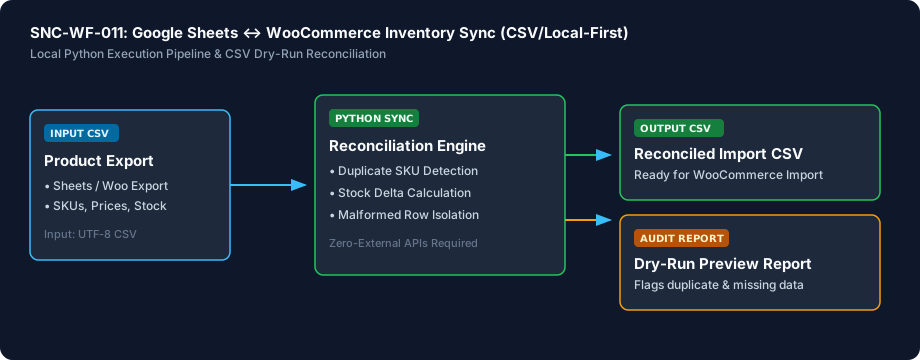
Architecture Diagram & Tested Capabilities

For technical teams or developers assisting your business, below is the visual execution architecture and automated verification breakdown:

Reconcile Google Sheets Stock with WooCommerce Before Syncing Architecture Pipeline Diagram
⚡Deterministic execution flow: runs on your own compute without telemetry tracking.

Verification Disclosure

The script reads a CSV export, performs SKU matching, detects duplicates, and produces a preview report. No external calls are made.

CSV Dry‑Run Preview

Shows mismatches without mutating any store data

Fully Tested

Duplicate SKU Detection

Flags colliding SKUs in the CSV

Fully Tested

Malformed Row Handling

Gracefully reports missing columns or invalid numbers

Fully Tested

Documented Limitations & Third-Party Costs

We believe in complete transparency. Review the documented technical boundaries and external service fee breakdown below prior to obtaining the package:

⚠️Documented Boundaries & Considerations

  • Offline Delta Preview: Processes local CSV exports. Does not directly update your live WooCommerce database without an import step.
  • SKU Matching Required: Items must have matching SKU identifiers in both files to detect deltas.
ComponentEstimated CostDetails & Free Tier Allowances
Inventory Sync Toolkit₹0 (Free to self-host)Download full source code and self-host
Optional Assisted Setup₹500 one-timeAssisted installation, environment setup, and handover
Hosting & Third-Party Fees₹0 recurringStandard Python local execution, no third-party APIs needed

Platform Compatibility & Technical Specifications

Operating System
Linux, macOS, Windows
Runtime / Python
Python 3.10+ Standard Library
Supported Platforms
WooCommerce 6.0+, Google Sheets, Excel / CSV
Required Inputs
  • Exported Google Sheets pricing/inventory CSV
  • Exported WooCommerce product catalog CSV
Generated Outputs
  • Reconciliation preview summary (matched, mismatched, missing)
  • Duplicate SKU collision warning report
  • Corrected import-ready CSV for manual store upload
Free Self-Hosted SoftwareInstant Download · Optional ₹500 Setup

Download or Set Up SNC-WF-011

Receive the complete distributable archive containing sync.py, step-by-step setup guides, mock fixtures, and automated test suites.

Free to self-host. Want Sanocea to set it up? ₹500 one-time.

Setup scope covers installation on customer-controlled infrastructure, configuration of authorised integrations, functional testing and handover.

Hosting, third-party charges and ongoing support are excluded unless separately agreed. Free workflows must never run on Sanocea-hosted infrastructure.

Download Free Package (.zip)Chat on WhatsAppWe reply within 2 business days (Monday to Saturday, 9:00 AM to 9:00 PM IST)

Frequently Asked Questions

Why use a CSV dry-run instead of direct live API sync plugins?

Direct live sync plugins often overwrite healthy stock levels on accidental bulk edits or when formula errors occur in spreadsheets. This toolkit generates a dry-run preview report and clean verified CSV, guaranteeing zero accidental store overwrites.

Does this tool require paid API subscriptions or Zapier?

No. It runs entirely on your local machine using Python's standard library with zero third-party software subscriptions or monthly fees.

How are duplicate SKUs handled?

The script scans your inventory sheet and identifies colliding SKUs, reporting line numbers so you can resolve catalog duplicates before importing to WooCommerce.

Can I use this with Microsoft Excel instead of Google Sheets?

Yes. Any spreadsheet tool capable of exporting standard UTF-8 comma-separated (CSV) files works seamlessly.

Reconciling Google Sheets Inventory with WooCommerce: Preventing Spreadsheet Sync Errors

How manual spreadsheet copy-pasting corrupts store inventory, why unverified imports overwrite live prices, and how offline delta auditing validates stock counts before upload.

Read Field Guide on Sanocea Insights →

Explore Related Self-Hosted Tools

F-E10Self-Hosted Python 3.8+

Catch Accidental ₹0 Prices & Missing SKUs Before Shoppers Order

Store Listing & Pricing Error Scanner (Free Tier)

A free, local Python tool that audits your online store products for catastrophic listing errors. It flags items accidentally priced at ₹0, products missing critical SKU codes, and listings with no images—sending a priority Telegram alert or terminal summary so you can fix mistakes before opportunistic buyers order.

SNC-WF-012Self-Hosted Python 3.8+

Get Alerted Before Fast-Selling Products Run Out of Stock

Low-Stock Inventory Alerter with State Deduplication (Free Tier)

A free, local Python tool that prevents unexpected stockouts on your bestsellers. It scans your inventory spreadsheet, detects items falling below safety reorder points, tracks alert history in a local SQLite database to prevent notification spam, and sends a clean Telegram briefing to your purchasing team.

SNC-WF-019Self-Hosted Python 3.8+

Catch Zero and Negative Inventory Before Multi-Channel Overselling Occurs

Multi-Channel Out-of-Stock Zero-Quantity Safety Guard (Free Tier)

A free, local Python safety tool that protects your marketplace seller ratings. It scans your product catalog or warehouse feeds, identifies zero-stock and negative-quantity variants, applies configurable safety buffers, and flags unfulfillable items so you can pause listings before marketplace cancellation penalties strike.