
SNC-WF-020 · Catalog Content & Tag Cleaner

Automatically Remove Expired Promo Tags from Markdown Files

SNC-WF-020 · Local-First Markdown Clearance-Tag Scheduler & Content Expiry Cleaner

A local-first Python tool for static ecommerce sites and Jamstack storefronts. It scans your markdown and MDX product files, compares promotional end-dates against the current time, and strips expired sale tags, discount banners, and clearance frontmatter—creating automatic .bak safety backups before touching any file.

PRODUCT SUMMARY AT A GLANCESNC-WF-020
Primary OutcomeScans static site and markdown catalog files, safely removing expired sale banners, promo tags, and clearance flags with automatic safety backups.
How It RunsRuns locally on any computer with Python 3.10+ (zero external services or APIs)
Setup ExpectationsFree to self-host on your own hardware. Free workflows never run on Sanocea infrastructure. Optional assisted setup: ₹500 one-time.
Verification StatusCode & Logic Tested: All 10 unit and integration tests pass in an isolated clean‑room environment.
The 3-Step Process in Simple English
1. Input

Directory of markdown (.md/.mdx) product or promotion files.

2. Transformation

Local Python script parses YAML frontmatter dates, identifies expired promos, and strips tags.

3. Output

Cleaned markdown files, automatic .bak backup files, and markdown_cleanup_summary.json.

Free to self-host. Want Sanocea to set it up? ₹500 one-time.

Setup scope covers installation on customer-controlled infrastructure, configuration of authorised integrations, functional testing and handover.

Hosting, third-party charges and ongoing support are excluded unless separately agreed. Free workflows must never run on Sanocea-hosted infrastructure.

Direct Download or Assisted Setup: Download the free toolkit below, or contact engineering on WhatsApp for ₹500 assisted setup on your machine.

What Goes Wrong in an Ordinary Working Day

After seasonal sales (like Diwali or Black Friday) end, clearance tags and promo badges linger on markdown product pages, confusing customers who expect expired discounts.

The Impact on Your Business & Customers

Leaving expired promo banners on your website damages credibility, creates customer service complaints, and leads to checkout discount disputes.

What This Tool Does & What Changes for You

Scans your product markdown directory, checks promotion end-dates in frontmatter, creates a .bak backup file, and strips expired promotional tags cleanly.

What Changes in Practice:

Your site automatically clears expired promotional copy on time, without developers manually editing dozens of markdown files.

Concrete Before & After Example (Actual Code Output)

Shows how expired Diwali or Black Friday tags are stripped from a product markdown file.

BEFORE: Product Markdown File with Expired Promo TagInput File
---
title: "Handmade Brass Table Lamp"
price: 1899
tags:
  - home-decor
  - clearance-sale-diwali-2024
promo_expires: "2024-11-15"
---
AFTER: Clean Product Markdown File (Automatic .bak created)normalized_inventory.csv
---
title: "Handmade Brass Table Lamp"
price: 1899
tags:
  - home-decor
---
[Safety copy created at lamp.md.bak]

Expired clearance tag removed cleanly. Original preserved in lamp.md.bak.

What Changed vs. What Remained Unchanged

✓ What Changed (Normalized):
  • Removed expired promotional tags and expired discount frontmatter
  • Created an automatic timestamped .bak backup file for every modified markdown document
  • Generated markdown_cleanup_summary.json logging all file changes
ℹ What Remained Unchanged:
  • Active unexpired promotions remain untouched
  • Core product body text, markdown styling, and non-promo tags preserved

What You Need Before Getting Started

  • Directory of markdown or MDX product files (.md, .mdx)
  • Python 3.10+ on your computer

Technical Setup Guidance:

Setup Difficulty & Expected Time

Step-by-Step Run Instructions (Zero-Code Terminal Run)

  1. Download and unzip snc-wf-020-markdown-tag-scheduler.zip.
  2. Place your markdown product directory path in the command.
  3. Run in preview mode first: python3 tag_scheduler.py --content-dir /path/to/products --dry-run
  4. Run live modification: python3 tag_scheduler.py --content-dir /path/to/products
  5. Review markdown_cleanup_summary.json for the audit log of all updated files.

What You Receive in the Download Archive

Every deliverable is clean, self-contained, and ready for immediate deployment. You receive the complete files, configuration templates, setup guides, and automated tests.

File NameDeliverable Description
clearance_scheduler.pyCore markdown clearance tag cleaner and campaign expiry engine
run.shExecution wrapper script
requirements.txtTest execution requirements (standard library only for runtime)
README.mdOperational usage guide & schema specifications
SETUP.mdStep‑by‑step local setup instructions & cron scheduling
COSTS.mdZero recurring cost declaration
LICENSING.mdSanocea Commercial License
tests/test_clearance_scheduler.pyPytest suite covering frontmatter, HTML blocks, inline tags, and backups
data/catalog_markdown/linen_shirt.mdSample product with frontmatter clearance tags
data/catalog_markdown/denim_jacket.mdSample product with timed HTML banner block
data/catalog_markdown/silk_scarf.mdSample product with active future promotion
data/catalog_markdown/chelsea_boots.mdSample clean catalog item

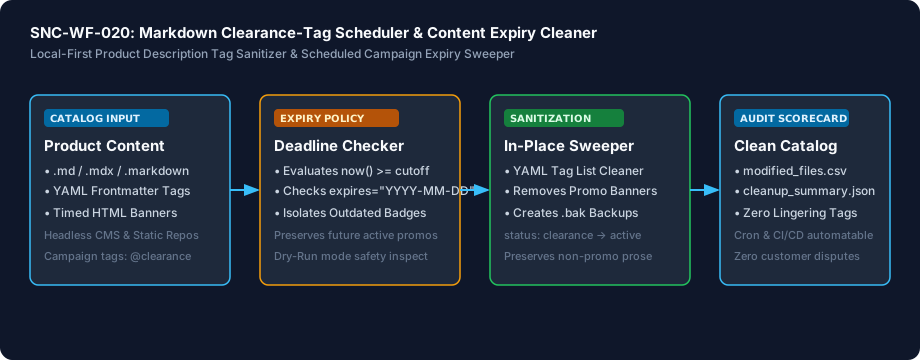
Architecture Diagram & Tested Capabilities

For technical teams or developers assisting your business, below is the visual execution architecture and automated verification breakdown:

Automatically Remove Expired Promo Tags from Markdown Files Architecture Pipeline Diagram
⚡Deterministic execution flow: runs on your own compute without telemetry tracking.

Verification Disclosure

The script parses YAML frontmatter tag arrays, sanitizes status and boolean attributes, strips timed HTML comment banners, and removes inline tags while generating automatic .bak backups.

Frontmatter Tag Sanitization

Parses YAML header arrays and attributes to remove expired campaign markers without corrupting file structure

Fully Tested

Timed Content Block Removal

Evaluates expires attributes on HTML comment blocks and strips expired banners while preserving active campaigns

Fully Tested

Safe In-Place Updates

Creates automatic timestamped .bak backups and outputs modified_files.csv and cleanup_summary.json

Fully Tested

Documented Limitations & Third-Party Costs

We believe in complete transparency. Review the documented technical boundaries and external service fee breakdown below prior to obtaining the package:

⚠️Documented Boundaries & Considerations

  • Markdown/Frontmatter Files Only: Designed for static site generators (Hugo, Next.js, Astro, Gatsby, Jekyll). Does not edit SQL databases or Shopify cloud stores directly.
  • Date Formatting: Promotion expiration dates must follow ISO format (YYYY-MM-DD or YYYY-MM-DDTHH:MM:SS) in frontmatter.
ComponentEstimated CostDetails & Free Tier Allowances
Markdown Clearance-Tag Scheduler Toolkit₹0 (Free to self-host)Download full source code and self-host
Optional Assisted Setup₹500 one-timeAssisted installation, environment setup, and handover
Hosting & Third-Party Fees₹0 recurringStandard Python local execution, no third-party APIs needed

Platform Compatibility & Technical Specifications

Operating System
Linux, macOS, Windows
Runtime / Python
Python 3.10+ Standard Library
Supported Platforms
Shopify Headless, Next.js / Astro, Contentful / Strapi, Git-based CMS, Markdown Files
Required Inputs
  • Product description markdown files (.md, .mdx)
  • Directory of catalog files or individual markdown path
Generated Outputs
  • modified_files.csv (Audit of cleaned files and lines modified)
  • clearance_cleanup_summary.json (Execution scorecard)
  • Automatic .bak safety backup files
Free Self-Hosted SoftwareInstant Download · Optional ₹500 Setup

Download or Set Up SNC-WF-020

Receive the complete distributable archive containing clearance_scheduler.py, step-by-step setup guides, mock fixtures, and automated test suites.

Free to self-host. Want Sanocea to set it up? ₹500 one-time.

Setup scope covers installation on customer-controlled infrastructure, configuration of authorised integrations, functional testing and handover.

Hosting, third-party charges and ongoing support are excluded unless separately agreed. Free workflows must never run on Sanocea-hosted infrastructure.

Download Free Package (.zip)Chat on WhatsAppWe reply within 2 business days (Monday to Saturday, 9:00 AM to 9:00 PM IST)

Frequently Asked Questions

What types of markdown clearance tags does this tool remove?

The scheduler strips YAML frontmatter tags (e.g. tags: [clearance, ...]), updates status fields (status: clearance to status: active), removes timed HTML comment blocks (<!-- clearance:start -->...<!-- clearance:end -->), and removes inline @clearance markers.

Can I keep future promotion banners while removing past expired ones?

Yes. If an HTML banner or inline tag includes an explicit expires="YYYY-MM-DD" attribute, the engine evaluates whether that date has passed. Active future promotions are preserved untouched.

Does this tool create backups before modifying my files?

Yes. By default, when --apply is passed, the engine creates an exact .bak copy of each modified file. You can disable this in version-controlled Git repos by passing --no-backup.

Can I automate this workflow using cron or GitHub Actions?

Yes. The tool runs locally via pure Python standard library with zero external dependencies, making it ideal for scheduled nightly cron jobs or automated Git CI/CD workflow triggers.

Markdown Clearance Tag Scheduling: Automating Promotional Content Expiry Across Catalog Files

How expired promotion tags linger on headless commerce sites, why stale clearance callouts confuse buyers, and how scheduled cleaners sanitize frontmatter.

Read Field Guide on Sanocea Insights →

Explore Related Self-Hosted Tools

SNC-WF-015Python 3.10+

Audit Shopify Product Exports for Bad SKUs & Missing Barcodes

Local-First Shopify SKU Audit & Catalogue Integrity Engine

A local-first Python tool that audits your Shopify catalog exports before publishing new products or syndicating to Google Shopping. It identifies duplicate SKUs, missing UPC/EAN barcodes, empty shipping weights, and discount pricing errors, quarantining flawed listings into an exception file with exact line numbers.

SNC-WF-016Python 3.10+

Turn Discontinued Product Links into Sales with 301 Redirects

Local-First Variant Unpublish & 301 URL Redirect Engine

A local-first Python tool that prevents lost traffic and Google rankings when products are discontinued. When you unpublish out-of-stock items, it generates clean 301 redirect mappings pointing visitors and search bots to the closest relevant category or parent product, complete with cyclic redirect loop protection.

SNC-WF-017Python 3.10+

Calculate Sellable Bundle Stock from Component Parts

Local-First Bundled Kit Stock Calculator & BOM Inventory Engine

A local-first Python tool that solves the bundled kit inventory dilemma. It reads your component stock levels and kit recipe formulas (e.g. 1 Gift Box = 2 Soaps + 1 Towel + 1 Candle), calculates the exact limiting component, applies safety buffer reserves, and outputs true sellable bundle quantities to prevent overselling.

SNC-WF-018Python 3.10+

Release Abandoned Cart Stock Reservations Back to Available Inventory

Local-First Checkout Hold TTL Cleaner & Atomic Stock Restoration Shield

A local-first Python tool that solves artificial stockouts. When customers start checkout or place unpaid bank-transfer orders, inventory is often locked for days. This engine scans reservation timestamps, identifies orders exceeding your expiry threshold (e.g. 30 minutes for cart locks or 24 hours for unpaid wire orders), and outputs a release manifest to restock items for paying buyers.