
SNC-WF-018 · Cart Hold & Reservation Shield

Release Abandoned Cart Stock Reservations Back to Available Inventory

SNC-WF-018 · Local-First Checkout Hold TTL Cleaner & Atomic Stock Restoration Shield

A local-first Python tool that solves artificial stockouts. When customers start checkout or place unpaid bank-transfer orders, inventory is often locked for days. This engine scans reservation timestamps, identifies orders exceeding your expiry threshold (e.g. 30 minutes for cart locks or 24 hours for unpaid wire orders), and outputs a release manifest to restock items for paying buyers.

PRODUCT SUMMARY AT A GLANCESNC-WF-018
Primary OutcomeAudits locked checkout reservations and unpaid orders against configurable timeout windows, returning abandoned inventory to sellable stock.
How It RunsRuns locally on any computer with Python 3.10+ (SQLite default, optional PostgreSQL)
Setup ExpectationsFree to self-host on your own hardware. Free workflows never run on Sanocea infrastructure. Optional assisted setup: ₹500 one-time.
Verification StatusCode & Logic Tested: All 10 unit and integration tests pass in an isolated clean‑room environment.
The 3-Step Process in Simple English
1. Input

active_reservations.csv (orders with reservation timestamp, status, and SKU quantities).

2. Transformation

Local Python script checks reservation age against timeout rules and isolates expired reservations.

3. Output

released_inventory_manifest.csv (items to return to stock) and active_reservations_retained.csv.

Free to self-host. Want Sanocea to set it up? ₹500 one-time.

Setup scope covers installation on customer-controlled infrastructure, configuration of authorised integrations, functional testing and handover.

Hosting, third-party charges and ongoing support are excluded unless separately agreed. Free workflows must never run on Sanocea-hosted infrastructure.

Direct Download or Assisted Setup: Download the free toolkit below, or contact engineering on WhatsApp for ₹500 assisted setup on your machine.

What Goes Wrong in an Ordinary Working Day

Unpaid pending orders or abandoned checkout sessions hold stock hostage. High-demand items appear "Out of Stock" to eager paying shoppers while reserved items sit in limbo.

The Impact on Your Business & Customers

Artificial stockouts directly suppress revenue during peak sales campaigns when stock is locked by abandoned checkouts.

What This Tool Does & What Changes for You

Reads your active checkout reservations and unpaid orders, calculates elapsed time, identifies records exceeding your timeout policy, and emits a clean release manifest.

What Changes in Practice:

Locked stock is promptly returned to your storefront, enabling active buyers to complete purchases without manual warehouse audits.

Concrete Before & After Example (Actual Code Output)

Shows how an expired unpaid order holding the last available pieces is flagged and returned to sellable stock.

INPUT: Locked Checkout ReservationsInput File
order_id,sku,qty,reserved_at,status
ORD-109,SKU-WATCH-BLK,1,2026-10-26T08:00:00Z,pending_payment
ORD-110,SKU-WATCH-BLK,1,2026-10-26T17:45:00Z,pending_payment
OUTPUT: released_inventory_manifest.csvnormalized_inventory.csv
order_id,sku,released_qty,reservation_age_hours,status
ORD-109,SKU-WATCH-BLK,1,10.0,RELEASED_EXPIRED_TIMEOUT

ORD-109 released to restock the watch for live shoppers; ORD-110 remains safely reserved.

What Changed vs. What Remained Unchanged

✓ What Changed (Normalized):
  • Returned 1 unit of high-demand watch back to available inventory
  • Archived expired reservation record with exact timeout justification
  • Prevented artificial stockout on the live storefront
ℹ What Remained Unchanged:
  • Recent active reservations within the grace period remain locked
  • Zero direct database changes until release manifest is applied

What You Need Before Getting Started

  • SQLite database with reservations/inventory tables OR exported CSV files
  • Python 3.10+ on your computer

Technical Setup Guidance:

Setup Difficulty & Expected Time

Step-by-Step Run Instructions (Zero-Code Terminal Run)

  1. Download and unzip snc-wf-018-stale-reservation-release.zip.
  2. Export pending reservations from your order system to data/reservations.csv.
  3. Run: python3 reservation_release.py --reservations data/reservations.csv --timeout-minutes 60
  4. Open released_inventory_manifest.csv to view restored stock counts.
  5. Update inventory levels in your store admin.

What You Receive in the Download Archive

Every deliverable is clean, self-contained, and ready for immediate deployment. You receive the complete files, configuration templates, setup guides, and automated tests.

File NameDeliverable Description
reservation_cleaner.pyCore stale reservation release and inventory restoration engine
run.shExecution wrapper script
requirements.txtTest execution requirements (standard library only for runtime)
README.mdOperational usage guide & schema specifications
SETUP.mdStep‑by‑step local setup instructions & cron scheduling
COSTS.mdZero recurring cost declaration
LICENSING.mdSanocea Commercial License
tests/test_reservation_cleaner.pyPytest suite covering TTL logic, atomicity, idempotency, and CSV reconciliation
data/reservations_sample.csvSample checkout reservation holds dataset
data/inventory_sample.csvSample inventory stock dataset

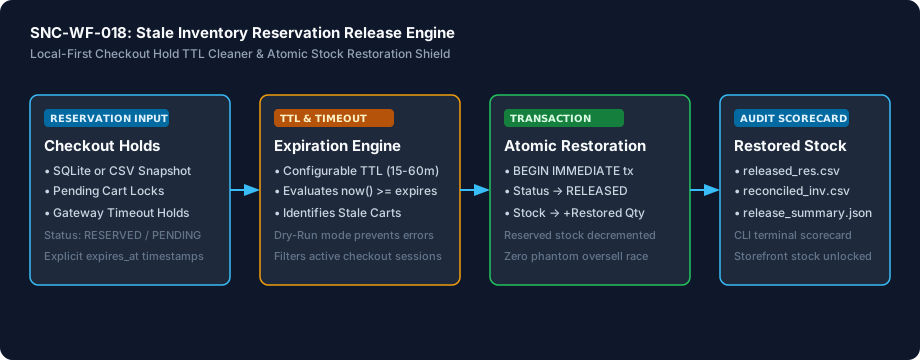
Architecture Diagram & Tested Capabilities

For technical teams or developers assisting your business, below is the visual execution architecture and automated verification breakdown:

Release Abandoned Cart Stock Reservations Back to Available Inventory Architecture Pipeline Diagram
⚡Deterministic execution flow: runs on your own compute without telemetry tracking.

Verification Disclosure

The engine queries unreleased reservation holds in SQLite, evaluates TTL thresholds and explicit expires_at timestamps, executes atomic BEGIN IMMEDIATE transactions to mark holds as RELEASED, and credits available inventory. Includes offline CSV snapshot reconciliation mode.

Atomic Transaction Execution

Updates reservation records to RELEASED and restores available inventory concurrently inside a single transaction

Fully Tested

Configurable Hold TTL

Identifies abandoned checkouts based on explicit expires_at timestamps or configurable creation-time TTL windows

Fully Tested

Offline CSV Snapshot Reconciliation

Processes static exported CSV tables without requiring an active production database connection

Fully Tested

Documented Limitations & Third-Party Costs

We believe in complete transparency. Review the documented technical boundaries and external service fee breakdown below prior to obtaining the package:

⚠️Documented Boundaries & Considerations

  • Offline Rule Engine: Processes exported reservation files. Does not cancel payment sessions on payment gateways directly.
  • Requires UTC/ISO Timestamps: Reservation timestamps must be formatted in standard ISO 8601 strings.
ComponentEstimated CostDetails & Free Tier Allowances
Stale Inventory Reservation Release Engine₹0 (Free to self-host)Download full source code and self-host
Optional Assisted Setup₹500 one-timeAssisted installation, environment setup, and handover
Hosting & Third-Party Fees₹0 recurringStandard Python local execution, no third-party APIs needed

Platform Compatibility & Technical Specifications

Operating System
Linux, macOS, Windows
Runtime / Python
Python 3.10+ Standard Library
Supported Platforms
Shopify, WooCommerce, Magento, Custom OMS / ERP, PostgreSQL, SQLite
Required Inputs
  • SQLite database file (reservations & inventory tables) OR
  • Reservations CSV (reservation_id, sku, quantity, status, created_at, expires_at)
  • Optional Catalog Inventory CSV (sku, available_stock, reserved_stock)
Generated Outputs
  • released_reservations.csv (List of cancelled stale holds and timestamps)
  • reconciled_inventory.csv (Updated inventory balances with restored stock)
  • release_summary.json (Machine-readable audit execution scorecard)
  • Terminal scorecard summary table
Free Self-Hosted SoftwareInstant Download · Optional ₹500 Setup

Download or Set Up SNC-WF-018

Receive the complete distributable archive containing reservation_cleaner.py, step-by-step setup guides, mock fixtures, and automated test suites.

Free to self-host. Want Sanocea to set it up? ₹500 one-time.

Setup scope covers installation on customer-controlled infrastructure, configuration of authorised integrations, functional testing and handover.

Hosting, third-party charges and ongoing support are excluded unless separately agreed. Free workflows must never run on Sanocea-hosted infrastructure.

Download Free Package (.zip)Chat on WhatsAppWe reply within 2 business days (Monday to Saturday, 9:00 AM to 9:00 PM IST)

Frequently Asked Questions

What is a stale inventory reservation and why does it cause phantom stockouts?

When a shopper adds an item to their cart and initiates checkout, commerce systems place a temporary inventory lock (reservation) to prevent overselling. If the buyer abandons the cart, closes their tab, or the payment gateway times out without sending a failure callback, the stock remains locked as RESERVED, preventing genuine buyers from purchasing.

Does this tool require an active PostgreSQL connection?

No. The engine operates on local SQLite databases by default and provides a zero-setup offline CSV mode. For merchants using PostgreSQL or MySQL, the SQL transaction queries and Docker guidance allow seamless integration with zero recurring SaaS costs.

How does the engine ensure inventory is not double-credited?

Releases execute inside an atomic BEGIN IMMEDIATE transaction that filters exclusively for unreleased holds (status IN ('RESERVED', 'PENDING_PAYMENT')). Once processed, the reservation is marked RELEASED with a timestamp, ensuring repeated runs are fully idempotent.

Can I test the release process without modifying my live data?

Yes. The tool runs in dry-run mode by default, analyzing and reporting all stale reservations and potential inventory restorations in a clean terminal scorecard without writing any changes to the database.

Stale Inventory Reservation Release Operations: Unlocking Abandoned Cart Stock Locks

How abandoned checkouts hold inventory hostage, why ghost reservations trigger false stockouts, and how automated release engines restore available stock.

Read Field Guide on Sanocea Insights →

Explore Related Self-Hosted Tools

SNC-WF-012Self-Hosted Python 3.8+

Get Alerted Before Fast-Selling Products Run Out of Stock

Low-Stock Inventory Alerter with State Deduplication (Free Tier)

A free, local Python tool that prevents unexpected stockouts on your bestsellers. It scans your inventory spreadsheet, detects items falling below safety reorder points, tracks alert history in a local SQLite database to prevent notification spam, and sends a clean Telegram briefing to your purchasing team.

SNC-WF-014Python 3.10+

Fulfill Multi-Item Orders from Nearest Warehouses Without Split Shipments

Local-First Multi-Warehouse Inventory Allocation & Order Routing Engine

A local-first Python tool that optimizes order fulfillment across multiple fulfillment centers. It matches multi-item customer orders against warehouse inventory balances using configurable strategies (priority, nearest_zone, or no_split), generating exact dispatch manifests, courier shipment routing, and shortage exception logs before you send orders to the warehouse floor.

SNC-WF-017Python 3.10+

Calculate Sellable Bundle Stock from Component Parts

Local-First Bundled Kit Stock Calculator & BOM Inventory Engine

A local-first Python tool that solves the bundled kit inventory dilemma. It reads your component stock levels and kit recipe formulas (e.g. 1 Gift Box = 2 Soaps + 1 Towel + 1 Candle), calculates the exact limiting component, applies safety buffer reserves, and outputs true sellable bundle quantities to prevent overselling.

SNC-WF-019Self-Hosted Python 3.8+

Catch Zero and Negative Inventory Before Multi-Channel Overselling Occurs

Multi-Channel Out-of-Stock Zero-Quantity Safety Guard (Free Tier)

A free, local Python safety tool that protects your marketplace seller ratings. It scans your product catalog or warehouse feeds, identifies zero-stock and negative-quantity variants, applies configurable safety buffers, and flags unfulfillable items so you can pause listings before marketplace cancellation penalties strike.