SNC-WF-103 · Feed Ingestion & Schema Shield

Clean Up Supplier Inventory Files in Minutes

SNC-WF-103 · Local-First CSV Inventory Normalizer & Supplier Feed Standardizer

A free, local Python tool that transforms messy supplier inventory CSV files into clean, standardized datasets in minutes. It maps 40+ column header variations, strips currency symbols and commas, expands pack quantities (e.g. "Pack of 3" or "Dozen") into true unit stock, and separates corrupted rows into an exceptions file—all on your own computer without touching live store data.

PRODUCT SUMMARY AT A GLANCESNC-WF-103
Primary OutcomeTransforms messy, inconsistent vendor spreadsheets into clean, standardized CSV files ready for store or ERP import—handling header aliases, currency symbols, and pack multipliers offline.
How It RunsRuns locally on any computer with Python 3.10+ (zero external services or APIs)
Setup ExpectationsFree to self-host on your own hardware. Free workflows never run on Sanocea infrastructure. Optional assisted setup: ₹500 one-time.
Verification StatusCode & Logic Tested: All 10 unit and integration tests pass in an isolated clean‑room environment.
The 3-Step Process in Simple English
1. Input

Any raw vendor CSV or spreadsheet export with messy headers (Item #, QOH), currency signs ($ or ₹), or packaging notes.

2. Transformation

Local Python script automatically maps columns, strips symbols/commas, expands pack counts, and validates every row.

3. Output

normalized_inventory.csv (clean ready-to-import data) and normalization_exceptions.csv (quarantined bad rows).

Free to self-host. Want Sanocea to set it up? ₹500 one-time.

Setup scope covers installation on customer-controlled infrastructure, configuration of authorised integrations, functional testing and handover.

Hosting, third-party charges and ongoing support are excluded unless separately agreed. Free workflows must never run on Sanocea-hosted infrastructure.

Direct Download or Assisted Setup: Download the free toolkit below, or contact engineering on WhatsApp for ₹500 assisted setup on your machine.

What Goes Wrong in an Ordinary Working Day

Supplier inventory spreadsheets arrive in completely inconsistent formats: random column names (Item #, PartNo, QOH), currency symbols inside price fields ($24.50, ₹499), and pack sizes (Box of 12, Pack of 6) that cause automated store imports to crash or dangerously under-count your sellable stock.

The Impact on Your Business & Customers

Manually cleaning vendor spreadsheets in Excel takes hours every morning and leads to human typing mistakes. If your store importer crashes or reads a "Pack of 6" as a single unit, you either lose sales by advertising depleted stock or oversell items you cannot fulfill.

What This Tool Does & What Changes for You

Reads your raw supplier CSV file, detects column headers using an internal 40+ alias dictionary, cleans numeric pricing, converts pack multipliers into individual piece counts, and writes a pristine canonical CSV plus an audit file of any corrupt rows.

What Changes in Practice:

Your operations team stops editing spreadsheets by hand. You run one command, and within seconds you have a clean, validated CSV ready for Shopify, WooCommerce, or your warehouse management system.

Concrete Before & After Example (Actual Code Output)

Below is an exact demonstration of how the CSV Inventory Normalizer processes real vendor data. The input on the left contains irregular column headers, currency symbols, and pack quantities. The output on the right is the exact CSV generated by the script.

BEFORE: Raw Messy Supplier CSVInput File
Item #,Description,Qty on Hand,Wholesale Price,MSRP,Packaging
sku-linen-shirt-wht-m,Classic Linen Shirt - White / M, 24 , $24.50 , $49.99 ,PCS
sku-cotton-tee-blk-3pk,Organic Cotton Crewneck Tee - Black, 10 , $15.00 , $35.00 ,Pack of 3
sku-wool-socks-gry-os,Merino Wool Boot Socks - Charcoal, 4 , $6.00 , $16.00 ,Dozen
,Missing SKU Product Line Item,15,$10.00,$20.00,PCS
sku-bad-stock,Sample Item,not-a-number,$12.00,$30.00,PCS

Notice: lowercase SKUs with spaces, currency symbols in prices, pack sizes ("Pack of 3", "Dozen"), and corrupted rows at the bottom.

AFTER: Clean Standardized CSVnormalized_inventory.csv
sku,title,available_stock,raw_stock_input,pack_multiplier,unit_of_measure,cost_price,retail_price,category,barcode
SKU-LINEN-SHIRT-WHT-M,Classic Linen Shirt - White / M,24,24,1,PCS,24.50,49.99,,
SKU-COTTON-TEE-BLK-3PK,Organic Cotton Crewneck Tee - Black,30,10,3,PCS,15.00,35.00,,
SKU-WOOL-SOCKS-GRY-OS,Merino Wool Boot Socks - Charcoal,48,4,12,PCS,6.00,16.00,,

Clean numbers, uppercase SKUs, pack multipliers expanded (10×3=30 units, 4×12=48 units). Missing SKU and non-numeric rows were safely quarantined into normalization_exceptions.csv!

What Changed vs. What Remained Unchanged

✓ What Changed (Normalized):
  • Column headers mapped to standard canonical names (Item # → sku, Qty on Hand → available_stock, Wholesale Price → cost_price)
  • Currency symbols ($) and commas stripped from prices, formatted as clean decimal numbers (24.50, 49.99)
  • Pack quantities expanded into total retail piece counts (Pack of 3: 10 raw → 30 available; Dozen: 4 raw → 48 available)
  • SKUs standardized to clean uppercase format (sku-linen-shirt-wht-m → SKU-LINEN-SHIRT-WHT-M)
  • Corrupted rows (missing SKU, text in stock) routed to normalization_exceptions.csv without crashing the run
ℹ What Remained Unchanged:
  • Product titles and item descriptions preserved exactly as provided by the supplier
  • Single-unit quantities without pack multipliers remained 1:1 (24 PCS → 24 available stock)
  • Your original vendor file is 100% untouched on disk (never overwritten or mutated)
  • Zero live store changes (does not alter your online Shopify or WooCommerce catalog directly)

What You Need Before Getting Started

  • Raw supplier inventory CSV or spreadsheet export.
  • Python 3.10+ installed on your computer.
  • Basic command-line terminal access.

Technical Setup Guidance: Offline local utility. Reads local files only; makes zero network calls and does not require API keys or cloud credentials.

Setup Difficulty & Expected Time

Takes 2 minutes. Unzip the package, drop in your supplier CSV, and run python3 inventory_normalizer.py.

Step-by-Step Run Instructions (Zero-Code Terminal Run)

  1. Download and unzip snc-wf-103-csv-inventory-normalizer.zip to a folder on your computer.
  2. Place your supplier CSV spreadsheet into the folder (or use data/messy_supplier_feed.csv to test).
  3. Open Terminal (macOS/Linux) or Command Prompt / PowerShell (Windows) in that folder.
  4. Run the tool: python3 inventory_normalizer.py --input data/messy_supplier_feed.csv (or run ./run.sh on Mac/Linux).
  5. Open normalized_inventory.csv to view your clean, standardized inventory file ready for store import.
  6. Check normalization_exceptions.csv for any quarantined rows that require supplier clarification.

What You Receive in the Download Archive

Every deliverable is clean, self-contained, and ready for immediate deployment. You receive the complete files, configuration templates, setup guides, and automated tests.

File NameDeliverable Description
inventory_normalizer.pyCore CSV inventory normalizer and supplier feed standardizer
run.shExecution wrapper script
requirements.txtTest execution requirements (standard library only for runtime)
README.mdOperational usage guide & schema specifications
SETUP.mdStep‑by‑step local setup instructions & mapping reference
COSTS.mdZero recurring cost declaration
LICENSING.mdSanocea Commercial License
tests/test_inventory_normalizer.pyPytest suite covering alias mapping, currency cleaning, pack expansions, and exceptions
data/messy_supplier_feed.csvRealistic sample supplier feed with currency signs and pack sizes

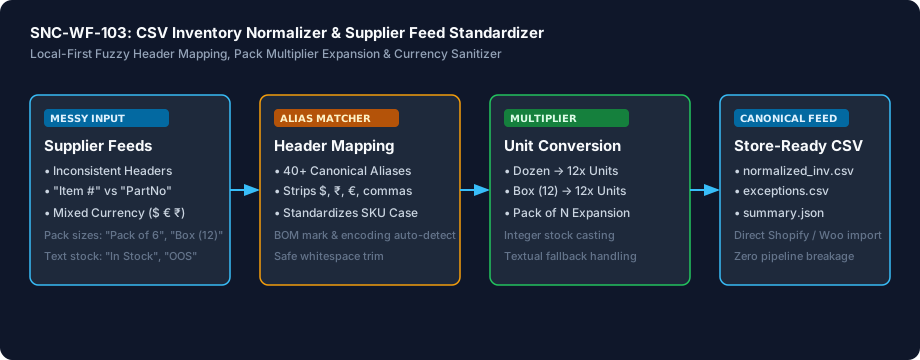
Architecture Diagram & Tested Capabilities

For technical teams or developers assisting your business, below is the visual execution architecture and automated verification breakdown:

Clean Up Supplier Inventory Files in Minutes Architecture Pipeline Diagram
⚡Deterministic execution flow: runs on your own compute without telemetry tracking.

Verification Disclosure

The engine detects 40+ fuzzy header aliases across supplier variations, strips currency formatting and commas, expands pack sizes into piece counts, and quarantines invalid rows into an exceptions manifest.

Fuzzy Header Normalization

Automatically aligns arbitrary column names (Item #, PartNo, QOH, Wholesale Price) to canonical inventory fields using a 40+ alias dictionary.

Fully Tested

Currency & Number Cleaning

Strips currency symbols ($, €, £, ₹, Rs., INR, USD) and commas, outputting clean standard floating-point prices and integer quantities.

Fully Tested

Pack Multiplier Conversion

Detects packaging descriptors like Pack of 3 or Dozen and computes true piece-level inventory counts (e.g. 10 packs of 3 = 30 retail units).

Fully Tested

Exception Quarantining

Safely moves rows with missing SKUs or non-numeric stock values into normalization_exceptions.csv without crashing or aborting the run.

Fully Tested

Scorecard & Audit Summary

Generates an instant terminal summary table and normalization_summary.json recording row counts, unit totals, and detected mappings.

Fully Tested

Documented Limitations & Third-Party Costs

We believe in complete transparency. Review the documented technical boundaries and external service fee breakdown below prior to obtaining the package:

⚠️Documented Boundaries & Considerations

  • Offline Local File Processing: Normalizes CSV files locally on your computer. It does NOT automatically download feeds from supplier FTP/SFTP servers, nor does it push directly to Shopify, WooCommerce, or marketplace APIs without an import tool.
  • Requires an Identifiable SKU: The input file must have at least one column that can be mapped to a product SKU or item code.
  • Count-Based Unit Conversions Only: Pack multiplier expansion supports standard piece counts (Pack of 6, Box of 12, Dozen, 24/cs). It does not perform dimensional or weight conversions (e.g. kg to lbs).
  • Does Not Mutate Store Data: The tool produces clean CSV output for review and import; it never alters or deletes records in your live ecommerce database.
ComponentEstimated CostDetails & Free Tier Allowances
CSV Inventory Normalizer Toolkit₹0 (Free to self-host)Download full source code and self-host
Optional Assisted Setup₹500 one-timeAssisted installation, environment setup, and handover
Hosting & Third-Party Fees₹0 recurringStandard Python local execution, no third-party APIs needed

Platform Compatibility & Technical Specifications

Operating System
Linux, macOS, Windows
Runtime / Python
Python 3.10+ Standard Library
Supported Platforms
Shopify, WooCommerce, Magento, Amazon Seller Central, Excel / CSV
Required Inputs
  • Messy supplier inventory CSV with arbitrary column headers, currency symbols, or pack sizes
Generated Outputs
  • normalized_inventory.csv (Canonical clean inventory dataset ready for store import)
  • normalization_exceptions.csv (Quarantined invalid rows with error diagnostics)
  • normalization_summary.json (Machine-readable audit scorecard)
Free Self-Hosted SoftwareInstant Download · Optional ₹500 Setup

Download or Set Up SNC-WF-103

Receive the complete distributable archive containing inventory_normalizer.py, step-by-step setup guides, mock fixtures, and automated test suites.

Free to self-host. Want Sanocea to set it up? ₹500 one-time.

Setup scope covers installation on customer-controlled infrastructure, configuration of authorised integrations, functional testing and handover.

Hosting, third-party charges and ongoing support are excluded unless separately agreed. Free workflows must never run on Sanocea-hosted infrastructure.

Download Free Package (.zip)Chat on WhatsAppWe reply within 2 business days (Monday to Saturday, 9:00 AM to 9:00 PM IST)

Frequently Asked Questions

How does the tool handle diverse supplier column header names?

The normalizer includes a built-in dictionary of over 40 fuzzy aliases. Whether your supplier labels their column 'Item #', 'PartNo', 'Item_Code', or 'Vendor SKU', the tool automatically maps it to the product SKU. The same applies to stock ('Qty on Hand', 'QOH', 'Units'), prices ('Wholesale Price', 'MSRP'), and barcodes ('UPC', 'EAN').

What happens when a supplier provides stock in 'Packs of 6' or 'Boxes of 12'?

By default, the normalizer extracts the packaging multiplier (e.g. 'Pack of 3' -> 3x, 'Dozen' -> 12x) and multiplies the raw quantity by that number (e.g. 10 packs of 3 = 30 available retail units). This prevents under-counting your stock when listing items individually in your store. If you sell the entire pack as a single unit, simply pass the --no-expand-packs flag.

How does the normalizer handle currency signs and formatted numbers?

It automatically strips currency symbols ($, €, £, ₹, Rs., INR, USD), commas, and spaces. For example, a wholesale cost formatted as ' $24.50 ' or 'Rs. 1,299' is cleaned into a standard decimal number like '24.50' or '1299.00' that your store or ERP import tool can ingest without errors.

Does this tool automatically update my live Shopify or WooCommerce store?

No. The CSV Inventory Normalizer is a local-first offline utility. It cleans and standardizes your supplier spreadsheets on your computer and outputs a clean CSV file. You can review the output and upload it to Shopify, WooCommerce, or your inventory management system using their standard CSV import features. It never makes external web requests or touches your live store data.

What happens if a supplier file contains corrupted or invalid rows?

Any row missing an essential product SKU or containing text inside a numeric quantity field (like 'not-a-number') is safely moved to normalization_exceptions.csv with its row number and reason. The valid rows continue processing, so a single bad row will never crash your entire catalog update.

Supplier CSV Inventory Normalization: Standardizing Mismatched Vendor Feeds Before Store Import

How inconsistent vendor spreadsheets crash inventory syncs, why pack multipliers distort unit counts, and how automated normalizers clean supplier data.

Read Field Guide on Sanocea Insights →

Explore Related Self-Hosted Tools

SNC-WF-011Python 3.10+

Reconcile Google Sheets Stock with WooCommerce Before Syncing

CSV‑only Inventory Reconciliation Preview

A local-first Python tool that prevents inventory overselling and pricing mistakes. It compares your warehouse Google Sheet against your live WooCommerce product export, generating an exact delta preview of which quantities and prices differ—allowing you to audit updates before importing them into your store.

SNC-WF-013Python 3.10+

Spot Supplier Price Increases & Stockouts Before Reordering

Local-First Supplier Price & Inventory Delta Calculator

A local-first Python tool that audits new supplier inventory files against your previous feed. It instantly highlights wholesale price increases (>X%), unexpected stock drops to zero, and new or discontinued SKUs, generating an executive delta report so you can adjust retail prices and reorder with full visibility.

SNC-WF-014Python 3.10+

Fulfill Multi-Item Orders from Nearest Warehouses Without Split Shipments

Local-First Multi-Warehouse Inventory Allocation & Order Routing Engine

A local-first Python tool that optimizes order fulfillment across multiple fulfillment centers. It matches multi-item customer orders against warehouse inventory balances using configurable strategies (priority, nearest_zone, or no_split), generating exact dispatch manifests, courier shipment routing, and shortage exception logs before you send orders to the warehouse floor.

SNC-WF-015Python 3.10+

Audit Shopify Product Exports for Bad SKUs & Missing Barcodes

Local-First Shopify SKU Audit & Catalogue Integrity Engine

A local-first Python tool that audits your Shopify catalog exports before publishing new products or syndicating to Google Shopping. It identifies duplicate SKUs, missing UPC/EAN barcodes, empty shipping weights, and discount pricing errors, quarantining flawed listings into an exception file with exact line numbers.

SNC-WF-017Python 3.10+

Calculate Sellable Bundle Stock from Component Parts

Local-First Bundled Kit Stock Calculator & BOM Inventory Engine

A local-first Python tool that solves the bundled kit inventory dilemma. It reads your component stock levels and kit recipe formulas (e.g. 1 Gift Box = 2 Soaps + 1 Towel + 1 Candle), calculates the exact limiting component, applies safety buffer reserves, and outputs true sellable bundle quantities to prevent overselling.