
SNC-WF-014 · Fulfillment & Split-Shipment Shield

Fulfill Multi-Item Orders from Nearest Warehouses Without Split Shipments

SNC-WF-014 · Local-First Multi-Warehouse Inventory Allocation & Order Routing Engine

A local-first Python tool that optimizes order fulfillment across multiple fulfillment centers. It matches multi-item customer orders against warehouse inventory balances using configurable strategies (priority, nearest_zone, or no_split), generating exact dispatch manifests, courier shipment routing, and shortage exception logs before you send orders to the warehouse floor.

PRODUCT SUMMARY AT A GLANCESNC-WF-014
Primary OutcomeSimulates order fulfillment against regional warehouse stock, assigning orders to the single nearest facility or optimal priority tier to minimize split shipments and courier costs.
How It RunsRuns locally on any computer with Python 3.10+ (no external services or APIs)
Setup ExpectationsFree to self-host on your own hardware. Free workflows never run on Sanocea infrastructure. Optional assisted setup: ₹500 one-time.
Verification StatusCode & Logic Tested: All 9 unit and integration tests pass in an isolated clean‑room environment.
The 3-Step Process in Simple English
1. Input

orders.csv (order lines with customer delivery pincodes/zones) and warehouse_inventory.csv (stock by warehouse ID).

2. Transformation

Local Python script evaluates fulfillment strategies (no_split, nearest_zone, priority), verifies stock balances, and decrements inventory.

3. Output

allocation_manifest.csv (orders mapped to warehouses), warehouse_balances.csv, and shortage_exceptions.csv.

Free to self-host. Want Sanocea to set it up? ₹500 one-time.

Setup scope covers installation on customer-controlled infrastructure, configuration of authorised integrations, functional testing and handover.

Hosting, third-party charges and ongoing support are excluded unless separately agreed. Free workflows must never run on Sanocea-hosted infrastructure.

Direct Download or Assisted Setup: Download the free toolkit below, or contact engineering on WhatsApp for ₹500 assisted setup on your machine.

What Goes Wrong in an Ordinary Working Day

When managing stock across multiple warehouses or retail stores, multi-item orders are often split haphazardly across distant facilities, doubling courier freight charges and frustrating customers with disjointed deliveries.

The Impact on Your Business & Customers

Split shipments destroy ecommerce operating margins by paying two courier delivery fees for a single order. Inefficient warehouse allocation also increases delivery transit times.

What This Tool Does & What Changes for You

Evaluates each incoming order against stock levels across all regional warehouses, tests allocation rules (nearest_zone, highest_stock, or no_split), and assigns items to the lowest-cost fulfillment path.

What Changes in Practice:

Your dispatch team receives a unified warehouse allocation manifest that consolidates orders into single shipments and eliminates guesswork.

Concrete Before & After Example (Actual Code Output)

Shows how the allocation engine fulfills an order from a single facility instead of causing an expensive split shipment.

INPUT: Order Line Items & Regional Warehouse StockInput File
Order #501 (Zone North): Item A (Qty 2), Item B (Qty 1)
Stock:
  WH-DELHI:  Item A (5), Item B (10)  [Zone North]
  WH-MUMBAI: Item A (10), Item B (0)  [Zone West]
OUTPUT: allocation_manifest.csvnormalized_inventory.csv
order_id,item_id,allocated_warehouse,quantity,shipping_zone,strategy_used,split_count
501,Item A,WH-DELHI,2,North,nearest_zone,1
501,Item B,WH-DELHI,1,North,nearest_zone,1

All items consolidated into WH-DELHI. Customer receives one package; merchant avoids paying double courier shipping charges.

What Changed vs. What Remained Unchanged

✓ What Changed (Normalized):
  • Assigned entire order to WH-DELHI avoiding an expensive multi-box split
  • Decremented inventory balances accurately across warehouses
  • Identified exact stock shortages for unfulfillable items
ℹ What Remained Unchanged:
  • Original customer order files remain intact on disk
  • Zero direct changes to your live OMS until you dispatch the manifest

What You Need Before Getting Started

  • Warehouse inventory CSV (warehouse_id, sku, available_stock, priority, zone)
  • Unfulfilled orders CSV (order_id, sku, requested_qty, customer_zone)
  • Python 3.10+ on your computer

Technical Setup Guidance:

Setup Difficulty & Expected Time

Step-by-Step Run Instructions (Zero-Code Terminal Run)

  1. Download and unzip snc-wf-014-multi-warehouse-allocator.zip.
  2. Place your orders.csv and warehouse_inventory.csv in the data/ folder.
  3. Run: python3 allocation_calculator.py --orders data/orders.csv --inventory data/warehouse_inventory.csv --strategy nearest_zone
  4. Open allocation_manifest.csv to view warehouse dispatch assignments.
  5. Check shortage_exceptions.csv if any order could not be fulfilled.

What You Receive in the Download Archive

Every deliverable is clean, self-contained, and ready for immediate deployment. You receive the complete files, configuration templates, setup guides, and automated tests.

File NameDeliverable Description
allocator.pyCore multi-warehouse allocation and routing engine
run.shExecution wrapper script
requirements.txtTest execution requirements (standard library only for runtime)
README.mdOperational usage guide & schema specifications
SETUP.mdStep‑by‑step local setup instructions
COSTS.mdZero recurring cost declaration
LICENSING.mdSanocea Commercial License
tests/test_allocator.pyPytest suite covering all allocation rules and edge cases
data/inventory.csvSample multi-warehouse inventory dataset
data/orders.csvSample unfulfilled customer orders dataset

Architecture Diagram & Tested Capabilities

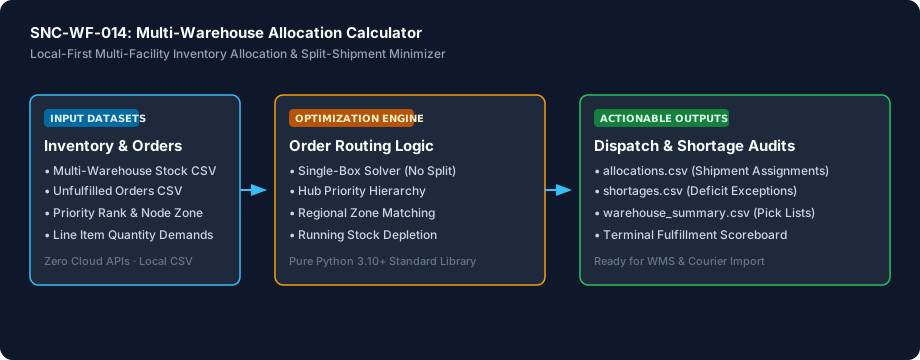
For technical teams or developers assisting your business, below is the visual execution architecture and automated verification breakdown:

Fulfill Multi-Item Orders from Nearest Warehouses Without Split Shipments Architecture Pipeline Diagram
⚡Deterministic execution flow: runs on your own compute without telemetry tracking.

Verification Disclosure

The script reads multi-warehouse stock balances and unfulfilled order CSVs, runs split-shipment minimization logic, prioritizes hub nodes, matches customer delivery zones, and exports allocations, shortage audits, and warehouse picklists. Zero external network calls are made.

Single-Box Split Minimization

Prioritizes routing complete orders to a single capable facility to eliminate multi-parcel carrier costs

Fully Tested

Multi-Strategy Allocation

Configurable allocation by minimum split, facility priority rank, regional zone matching, or stock balancing

Fully Tested

Shortage & Deficit Exception Auditing

Detects out-of-stock items and unknown SKUs, exporting structured shortage manifests

Fully Tested

Documented Limitations & Third-Party Costs

We believe in complete transparency. Review the documented technical boundaries and external service fee breakdown below prior to obtaining the package:

⚠️Documented Boundaries & Considerations

  • Offline Calculation: Runs locally on CSV files. Does not directly trigger warehouse dispatch APIs or courier labels without integration.
  • Strategy Strictness: In "no_split" mode, orders that cannot be completely fulfilled from a single warehouse are marked as unassigned rather than split.
ComponentEstimated CostDetails & Free Tier Allowances
Multi-Warehouse Allocation Toolkit₹0 (Free to self-host)Download full source code and self-host
Optional Assisted Setup₹500 one-timeAssisted installation, environment setup, and handover
Hosting & Third-Party Fees₹0 recurringStandard Python local execution, no third-party APIs needed

Platform Compatibility & Technical Specifications

Operating System
Linux, macOS, Windows
Runtime / Python
Python 3.10+ Standard Library
Supported Platforms
Shopify, WooCommerce, Magento, Custom ERPs, Excel / CSV
Required Inputs
  • Warehouse inventory CSV (warehouse_id, sku, available_stock, priority, zone)
  • Unfulfilled orders CSV (order_id, sku, requested_qty, customer_zone)
Generated Outputs
  • Formatted terminal allocation scoreboard
  • allocations.csv (Shipment assignments per warehouse)
  • shortages.csv (Unfulfilled quantity and shortage root causes)
  • warehouse_summary.csv (Starting balance, picked units, and projected stock)
Free Self-Hosted SoftwareInstant Download · Optional ₹500 Setup

Download or Set Up SNC-WF-014

Receive the complete distributable archive containing allocator.py, step-by-step setup guides, mock fixtures, and automated test suites.

Free to self-host. Want Sanocea to set it up? ₹500 one-time.

Setup scope covers installation on customer-controlled infrastructure, configuration of authorised integrations, functional testing and handover.

Hosting, third-party charges and ongoing support are excluded unless separately agreed. Free workflows must never run on Sanocea-hosted infrastructure.

Download Free Package (.zip)Chat on WhatsAppWe reply within 2 business days (Monday to Saturday, 9:00 AM to 9:00 PM IST)

Frequently Asked Questions

How does this engine prevent expensive split shipments?

By default, the engine executes the 'no_split' heuristic: for every order, it evaluates all candidate warehouses to find any single facility capable of fulfilling 100% of line items. Only when no single location holds sufficient stock does it fall back to multi-node split shipments.

Can I enforce central warehouse priority over regional warehouses?

Yes. Each warehouse row includes an optional priority integer (e.g. 1 for central distribution hub, 2 for regional depot). When multiple warehouses can fulfill an order, the engine automatically selects the highest-priority facility.

Does this tool require external cloud hosting or enterprise ERP licenses?

No. The allocator runs 100% locally on your machine using Python standard library components. There are zero cloud compute fees, database server prerequisites, or recurring software charges.

What happens if an order cannot be fulfilled due to stock shortages?

The engine logs all unfulfillable units to a structured shortages.csv manifest, detailing the exact order ID, SKU, missing quantity, and root cause (such as INSUFFICIENT_GLOBAL_STOCK or UNKNOWN_SKU) without corrupting running inventory balances.

Multi-Warehouse Inventory Allocation: Minimizing Split Shipments and Courier Freight Overcharges

How multi-node fulfillment operations split customer baskets across distant warehouses, why unmanaged allocations double shipping costs, and how single-box algorithms route orders.

Read Field Guide on Sanocea Insights →

Explore Related Self-Hosted Tools

SNC-WF-013Python 3.10+

Spot Supplier Price Increases & Stockouts Before Reordering

Local-First Supplier Price & Inventory Delta Calculator

A local-first Python tool that audits new supplier inventory files against your previous feed. It instantly highlights wholesale price increases (>X%), unexpected stock drops to zero, and new or discontinued SKUs, generating an executive delta report so you can adjust retail prices and reorder with full visibility.

SNC-WF-019Self-Hosted Python 3.8+

Catch Zero and Negative Inventory Before Multi-Channel Overselling Occurs

Multi-Channel Out-of-Stock Zero-Quantity Safety Guard (Free Tier)

A free, local Python safety tool that protects your marketplace seller ratings. It scans your product catalog or warehouse feeds, identifies zero-stock and negative-quantity variants, applies configurable safety buffers, and flags unfulfillable items so you can pause listings before marketplace cancellation penalties strike.

SNC-WF-068Self-Hosted Python 3.8+

Daily Unfulfilled Orders SLA Breach Summary Report & Dispatch Briefing

Daily Unfulfilled Orders SLA Breach Summary Report (Free Tier)

A free, local Python reporting tool that converts raw order exports into a structured warehouse dispatch briefing. It sorts your unfulfilled backlog into clear urgency buckets, calculates fulfillment aging, and produces a printable or spreadsheet-ready dispatch summary so your packing crew knows exactly which packages must ship first.

E03Managed Service

Catch Fulfillment Delays and SLA Breaches Before Customer Complaints Escalate

Late-Order Fulfillment SLA Monitor & Escalation Digest

An enterprise continuous fulfillment monitor hosted on Sanocea private VPS infrastructure. It audits your unfulfilled order queue every 15 minutes, categorizes aging orders across 24h, 48h, and 72h breach thresholds, alerts warehouse managers on Telegram, and delivers daily executive fulfillment briefings so your dispatch team never misses an SLA deadline.