
SNC-WF-068 · Free Tier · SLA & Logistics

Daily Unfulfilled Orders SLA Breach Summary Report & Dispatch Briefing

SNC-WF-068 · Daily Unfulfilled Orders SLA Breach Summary Report (Free Tier)

A free, local Python reporting tool that converts raw order exports into a structured warehouse dispatch briefing. It sorts your unfulfilled backlog into clear urgency buckets, calculates fulfillment aging, and produces a printable or spreadsheet-ready dispatch summary so your packing crew knows exactly which packages must ship first.

PRODUCT SUMMARY AT A GLANCESNC-WF-068
Primary OutcomeGenerates a clean daily summary report of unfulfilled store orders categorized by aging hours (24h/48h/72h) for morning warehouse dispatch.
How It RunsSelf-Hosted Python 3.8+ (Runs on your own computer or server)
Setup ExpectationsFree to self-host on your own hardware. Free workflows never run on Sanocea infrastructure. Optional assisted setup: ₹500 one-time.
Verification StatusCode & Logic Tested: Tested against open order queues with variable fulfillment delay timestamps
The 3-Step Process in Simple English
1. Input

orders_unfulfilled.csv export from your store or ERP.

2. Transformation

Local Python script calculates elapsed hours per order, assigns aging tiers, and ranks by dispatch priority.

3. Output

sla_breach_dispatch_report.csv and formatted terminal dispatch briefing.

Free to self-host. Want Sanocea to set it up? ₹500 one-time.

Setup scope covers installation on customer-controlled infrastructure, configuration of authorised integrations, functional testing and handover.

Hosting, third-party charges and ongoing support are excluded unless separately agreed. Free workflows must never run on Sanocea-hosted infrastructure.

Direct Download or Assisted Setup: Download the free toolkit below, or contact engineering on WhatsApp for ₹500 assisted setup on your machine.

What Goes Wrong in an Ordinary Working Day

Warehouse managers spend the first hour of every morning manually sorting through order exports to figure out which orders are overdue and which can wait.

The Impact on Your Business & Customers

Shipping orders out of sequence means older orders breach dispatch SLAs while newer orders get shipped first, increasing cancellation risks.

What This Tool Does & What Changes for You

Takes an export of pending orders, calculates elapsed fulfillment hours, categorizes orders into SLA compliance tiers, and outputs an actionable morning dispatch report.

What Changes in Practice:

Your dispatch team begins packing immediately each morning with an unambiguous, SLA-prioritized checklist.

Concrete Before & After Example (Actual Code Output)

Shows how a messy order spreadsheet is transformed into a prioritized warehouse dispatch sheet.

INPUT: Raw Unfulfilled Orders ExportInput File
order_id,created_at,total,customer_name
#301,2026-10-24T09:00:00Z,1850.00,Ramesh Patel
#302,2026-10-26T11:00:00Z,950.00,Pooja Sharma
OUTPUT: sla_breach_dispatch_report.csvnormalized_inventory.csv
priority_rank,order_id,aging_tier,hours_delayed,customer_name,action
1,#301,CRITICAL (>48h),57.2,Ramesh Patel,Ship Immediately (High Cancellation Risk)
2,#302,NORMAL (<24h),7.2,Pooja Sharma,Standard Dispatch Queue

Warehouse packing team receives an unambiguous prioritized checklist every morning.

What Changed vs. What Remained Unchanged

✓ What Changed (Normalized):
  • Ranked orders by true SLA urgency rather than arbitrary order numbers
  • Calculated exact delay hours per shipment
  • Exported clean dispatch checklist for warehouse floor staff
ℹ What Remained Unchanged:
  • Customer data and payment details preserved intact
  • Original order export file preserved without changes

What You Need Before Getting Started

  • Store read API credentials (read orders scope only).
  • Telegram bot token and chat ID.
  • Python 3.8+ on your computer or server.

Technical Setup Guidance: Read-only access. Never alters order status or customer details.

Setup Difficulty & Expected Time

Takes 5 minutes. Download the free tool, configure your store credentials, and set an 8:00 AM cron.

Step-by-Step Run Instructions (Zero-Code Terminal Run)

  1. Download and unzip snc-wf-068-sla-breach-report.zip.
  2. Place your store order export in data/orders_unfulfilled.csv.
  3. Run: python3 sla_breach_report.py --input data/orders_unfulfilled.csv
  4. Open sla_breach_dispatch_report.csv to view prioritized packing order.
  5. Hand the priority list to your warehouse dispatch lead.

What You Receive in the Download Archive

Every deliverable is clean, self-contained, and ready for immediate deployment. You receive the complete files, configuration templates, setup guides, and automated tests.

File NameDeliverable Description
sla_report.pyStandalone Python 3.8+ fulfillment SLA breach audit script
fixtures/sample_unfulfilled.jsonSample unfulfilled orders fixture with delayed timestamps
README.mdSetup documentation, scheduling guide, and SLA threshold settings
SETUP.mdQuickstart instructions
COSTS.mdOperating cost disclosure (₹0 ongoing fees)
LICENSING.mdSanocea Open Workflow License (MIT Compatible)
tests/test_sla_report.pyAutomated test suite verifying delay filtering and destination grouping

Architecture Diagram & Tested Capabilities

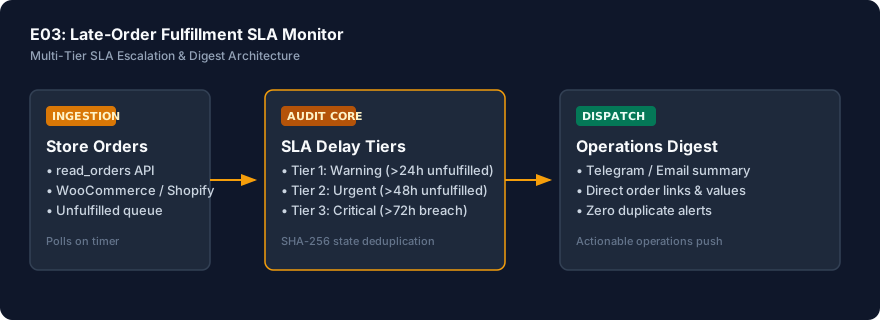
For technical teams or developers assisting your business, below is the visual execution architecture and automated verification breakdown:

Daily Unfulfilled Orders SLA Breach Summary Report & Dispatch Briefing Architecture Pipeline Diagram
⚡Deterministic execution flow: runs on your own compute without telemetry tracking.

Verification Disclosure

Calculates delay duration in hours, isolates orders past SLA thresholds, and ranks backlog by delay urgency and total order value.

Configurable SLA Threshold

Default 48-hour cutoff, easily configurable for same-day or 24-hour dispatch rules.

Fully Tested

Destination City Breakdown

Groups delayed shipments by delivery city to expedite regional carrier pickups.

Fully Tested

Financial Value at Risk

Computes total monetary value of delayed shipments facing cancellation risk.

Fully Tested

Documented Limitations & Third-Party Costs

We believe in complete transparency. Review the documented technical boundaries and external service fee breakdown below prior to obtaining the package:

⚠️Documented Boundaries & Considerations

  • Offline Report Generator: Generates reporting CSVs on local compute; does not integrate directly with physical label printers.
  • Requires Created Timestamps: Input orders must have standard ISO or date-time creation timestamps.
ComponentEstimated CostDetails & Free Tier Allowances
SLA Breach Report Tool₹0 (Free to self-host)Download full source code and run locally
Optional Assisted Setup₹500 one-timeAssisted installation, store API integration, and morning scheduling
Recurring Fees₹0 ForeverZero third-party API or subscription charges

Platform Compatibility & Technical Specifications

Operating System
Linux, macOS, Windows
Runtime / Python
Python 3.8+
Supported Platforms
WooCommerce, Shopify, Custom WMS
Required Inputs
  • Pending orders export CSV
  • SLA threshold (default 48 hours)
Generated Outputs
  • Overdue order dispatch priority list
  • Grouped destination summary for batch courier pickup
  • Total delayed merchandise valuation
Free Self-Hosted SoftwareInstant Download · Optional ₹500 Setup

Download or Set Up SNC-WF-068

Receive the complete distributable archive containing sla_report.py, step-by-step setup guides, mock fixtures, and automated test suites.

Free to self-host. Want Sanocea to set it up? ₹500 one-time.

Setup scope covers installation on customer-controlled infrastructure, configuration of authorised integrations, functional testing and handover.

Hosting, third-party charges and ongoing support are excluded unless separately agreed. Free workflows must never run on Sanocea-hosted infrastructure.

Download Free Package (.zip)Chat on WhatsAppWe reply within 2 business days (Monday to Saturday, 9:00 AM to 9:00 PM IST)

Frequently Asked Questions

How does grouping by destination help warehouse packing?

Orders can be batched by courier service zones (e.g., North, South, Metro) to hand over early to morning line-haul freight pickups.

Can we customize the SLA threshold beyond 48 hours?

Yes. You can configure any cutoff threshold (e.g., 24h for express delivery or 72h for customized goods) in the configuration.

Is any customer personal data exposed externally?

No. The report aggregates data locally and only posts internal operational counts and order numbers to your private channel.

Warehouse Fulfillment SLA Breach Reporting: Tracking Delayed Orders by Destination State

How unfulfilled warehouse queues silently breach customer dispatch promises, why aging backlogs increase cancellation rates, and how automated reports group orders by destination state.

Read Field Guide on Sanocea Insights →

Explore Related Self-Hosted Tools

E03Managed Service

Catch Fulfillment Delays and SLA Breaches Before Customer Complaints Escalate

Late-Order Fulfillment SLA Monitor & Escalation Digest

An enterprise continuous fulfillment monitor hosted on Sanocea private VPS infrastructure. It audits your unfulfilled order queue every 15 minutes, categorizes aging orders across 24h, 48h, and 72h breach thresholds, alerts warehouse managers on Telegram, and delivers daily executive fulfillment briefings so your dispatch team never misses an SLA deadline.

F-E03Self-Hosted Python 3.8+

Catch Stuck and Delayed Unfulfilled Orders Before Customers Complain

Daily Stalled Order Sweeper (Free Tier)

A free, local Python tool that audits your fulfillment pipeline. It queries your pending store orders, filters orders exceeding your dispatch SLA (e.g. unfulfilled > 24 hours), categorizes aging bottlenecks, and generates an executive dispatch briefing so your packing team can ship delayed orders before customer service escalations occur.

SNC-WF-093Self-Hosted Python 3.8+

Catch Domestic Parcels Stuck in Transit Before RTOs and Customer Escalations

Domestic Courier Tracking Poller & Transit Delay Alerter (Free Tier)

A free, local Python logistics tracker that protects your delivery success rate. It reads your active courier tracking numbers (e.g. Delhivery, Bluedart, Shiprocket), checks latest tracking milestones, flags shipments with no status movement for over 72 hours or failed delivery attempts, and generates an intervention report so customer support can prevent return-to-origin (RTO) losses.