SANOCEA™Workflows Library
Contact Engineering
S01 · CUSTOMER ENQUIRIES & SALES

Keep Every Customer Enquiry in One Place

S01 · Lead Form to Google Sheets & Email Ack

Receives supported form submissions, records valid lead information in Google Sheets and sends an acknowledgement email.

PRODUCT SUMMARY AT A GLANCES01
Primary OutcomeRecords customer form enquiries into a Google Sheet and sends an instant receipt email to the prospective customer.
How It RunsRuns on n8n (Self-hosted or Cloud)
Setup ExpectationsRequires n8n, Google Sheets access, and email-sending configuration.
Verification StatusLogic & Settings Verified: Configuration verified; not live-imported into n8n
Current Acquisition: Staged private preview · Inquiries handled directly by engineering with invoices issued within 1 business day.
Enquire by Email (S01) →

What Goes Wrong in an Ordinary Working Day

Enquiries from a website form can be scattered across different inboxes, website backends, or form builder tools, making them harder to track and follow up.

The Impact on Your Business & Customers

A prospective customer may not receive timely acknowledgement, and a business can lose track of who contacted it and whether someone followed up.

What This Tool Does & What Changes for You

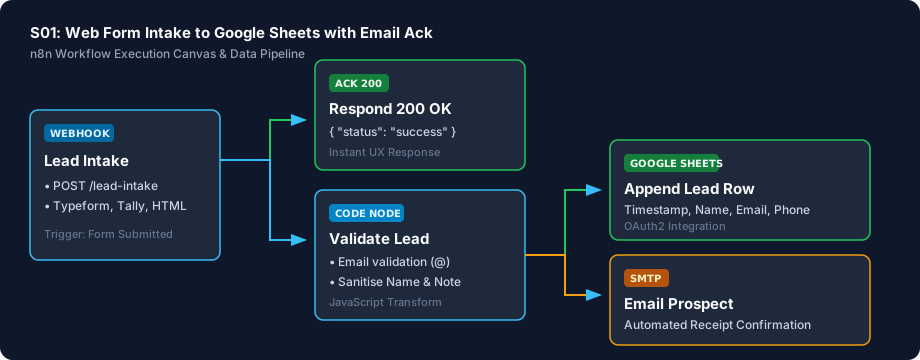
When someone fills out a contact or enquiry form on your website, this workflow receives the information, adds a neat new row to your Google Sheet (name, email, phone, timestamp, and message), and sends an automated professional acknowledgement email to the customer letting them know their message arrived safely.

What Changes in Practice:

Creates a more consistent process for recording new enquiries and confirming receipt. Your sales team has one central spreadsheet to track leads, and customers get immediate confirmation.

What You Need Before Getting Started

  • A contact or lead form on your website capable of sending submissions to a webhook URL.
  • A Google account with access to Google Sheets.
  • An outbound email account or SMTP service to send acknowledgement emails.
  • A running installation of n8n (self-hosted or cloud-hosted).

Technical Setup Guidance: Connecting Google Sheets requires a one-time OAuth consent in n8n. If you are not familiar with n8n or Google Cloud console permissions, basic technical help may be useful.

Setup Difficulty & Expected Time

Moderate (10–15 minutes). Involves connecting your Google account in n8n and pointing your web form to the n8n webhook URL.

What You Receive in the Download Archive

Every deliverable is clean, self-contained, and ready for immediate deployment. You receive the complete files, configuration templates, setup guides, and automated tests.

File NameDeliverable Description
workflow.jsonReady-to-import n8n workflow canvas using official core nodes
workflow_preview.svgVisual architecture and execution pipeline diagram
test_payload.jsonRealistic inbound form submission test fixture
.env.exampleConfiguration parameter template
SETUP.mdStep-by-step installation and testing instructions
CREDENTIALS.mdGoogle Sheets OAuth2 and SMTP credential setup guide
COSTS.mdTransparent third-party API and quota disclosures
LICENSING.mdSanocea Commercial License & Author Verification
tests/test_s01_workflow.pyReproducible validation test suite

Architecture Diagram & Tested Capabilities

For technical teams or developers assisting your business, below is the visual execution architecture and automated verification breakdown:

Keep Every Customer Enquiry in One Place Architecture Pipeline Diagram
⚡Deterministic execution flow: runs on your own compute with zero telemetry tracking.

Verification Disclosure

The workflow data extraction, email validation logic, and spreadsheet row formatting have been verified against sample submissions in local tests. Note: This workflow has not been imported into a live, multi-tenant n8n production server.

Form Submission Parsing

Extracts contact details and timestamps from incoming web form payloads.

Fully Tested

Email Validation Check

Verifies email address syntax so broken addresses are flagged.

Fully Tested

Name Resolution & Email Template

Handles single-name or split first/last names to create clean confirmation emails.

Fully Tested

Google Sheets & Email Node Schemas

Verified node settings against official n8n specifications; not executed on live n8n server.

Schema-Checked

Documented Limitations & Third-Party Costs

We believe in complete transparency. Review the documented technical boundaries and external service fee breakdown below prior to obtaining the package:

⚠️Documented Boundaries & Considerations

  • Google Sheets OAuth token requires initial one-time browser consent via n8n's credential manager modal.
  • Subject to Google Cloud standard rate limits (300 requests per minute per project).
  • Canvas verification status: Schema-validated and Node.js transform tested; not executed against live production canvas during local certification.
ComponentEstimated CostDetails & Free Tier Allowances
Sanocea Workflow License₹0 / $0Self-contained commercial package
n8n Community Edition₹0 / FreeFree self-hosted on your server or PC
Google Sheets APIFree tierIncluded in standard Google account quotas (300 req/min)
Outbound EmailFree tierUses existing business email or free SMTP tier (100 emails/day)
Web FormsFree / ExistingWorks with any custom HTML form or existing form provider
Ready for DeploymentPrivate Preview · Direct Email Inquiries

Acquire the S01 Package

Receive the complete distributable archive containing workflow.json, step-by-step setup guides, mock fixtures, and automated test suites.

Direct Delivery via EngineeringSelf-service payment checkout is currently undergoing staged integration testing. For immediate customer delivery or technical licensing enquiries, contact us directly at hello@sanocea.com. We issue packages with custom invoices within 1 business day.
Inquire to Acquire (S01) →Direct engineer-verified delivery · Instant digital archive via secure link

Explore Other Self-Hosted Tools

F02Python 3.10+

Stay on Top of Unpaid Invoices

Overdue Payment Reminders Sweeper

Reads an invoice CSV file, identifies invoices that meet configured overdue rules and prepares or sends reminders according to its escalation schedule and suppression rules.