
Know when your website goes down before your customers do.
Checks whether your website is responding and whether its security certificate is approaching expiry, then sends an alert when a configured problem is detected.
Sends an order summary to a designated Telegram or Slack channel when a supported Shopify or WooCommerce order event arrives.
Important customer orders and special requests can get buried in store email notifications or remain unnoticed in the store dashboard.
Staff may overlook an order that needs prompt attention, delaying fulfillment, frustrating customers, or missing time-sensitive customization requests.
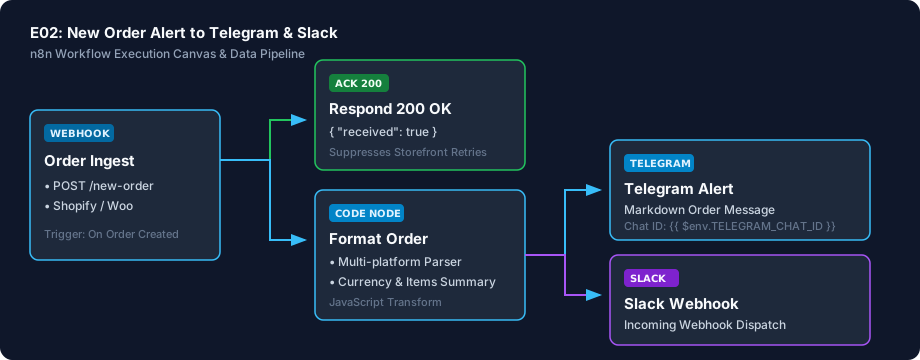
When a customer completes checkout on your Shopify or WooCommerce store, this workflow captures the order information, formats it into an easy-to-read summary (customer name, items purchased, total amount, and delivery notes), and posts it immediately into your team's Telegram or Slack channel.
Gives the team another place to see new orders quickly, helping staff start packing or coordinating fulfillment without constantly refreshing an inbox.
Technical Setup Guidance: This workflow requires n8n. If your business does not already run an automation tool, setting up n8n or connecting store webhooks may require basic technical assistance.
Moderate (10–15 minutes once n8n is running). Requires copying webhook URLs and pasting chat credentials.
Every deliverable is clean, self-contained, and ready for immediate deployment. You receive the complete files, configuration templates, setup guides, and automated tests.
| File Name | Deliverable Description |
|---|---|
workflow.json | Ready-to-import n8n workflow file using official core nodes |
workflow_preview.svg | Visual architecture and execution pipeline diagram |
test_payload_shopify.json | Realistic Shopify order test fixture |
test_payload_woocommerce.json | Realistic WooCommerce order test fixture |
.env.example | Configuration parameter template |
SETUP.md | Step-by-step import and webhook configuration guide |
CREDENTIALS.md | Step-by-step token and webhook setup instructions |
COSTS.md | Complete free-tier and external pricing disclosures |
LICENSING.md | Sanocea Commercial License & Author Verification |
tests/test_e02_workflow.py | Reproducible validation test suite |
For technical teams or developers assisting your business, below is the visual execution architecture and automated verification breakdown:
The workflow structure, data cleaning logic, and field formatting were tested and verified against sample order payloads in an isolated test suite. Note: This workflow has not been imported or executed on a live, multi-tenant n8n production server.
Normalises order data from both Shopify and WooCommerce into clean, consistent text.
Handles large orders cleanly without cutting off important customer details.
Built using official standard n8n nodes with zero community dependencies or AI plugins.
Verified node configurations against official specifications; not executed on a live n8n server.
We believe in complete transparency. Review the documented technical boundaries and external service fee breakdown below prior to obtaining the package:
| Component | Estimated Cost | Details & Free Tier Allowances |
|---|---|---|
| Sanocea Workflow License | ₹0 / $0 | Full commercial rights for self-hosted execution |
| n8n Community Edition | ₹0 / Free | Free & Open Source when self-hosted |
| Optional n8n Cloud | €20/month | Only if managed hosting is preferred over self-hosting |
| Storefront Platform | Existing Plan | Works with existing Shopify / WooCommerce stores |
| Chat Dispatch (Telegram/Slack) | 100% Free | Standard bot APIs have zero message delivery fees |
Receive the complete distributable archive containing workflow.json, step-by-step setup guides, mock fixtures, and automated test suites.
hello@sanocea.com. We issue packages with custom invoices within 1 business day.Checks whether your website is responding and whether its security certificate is approaching expiry, then sends an alert when a configured problem is detected.
Receives supported form submissions, records valid lead information in Google Sheets and sends an acknowledgement email.
Reads an invoice CSV file, identifies invoices that meet configured overdue rules and prepares or sends reminders according to its escalation schedule and suppression rules.
Accepts an incoming event, acknowledges receipt and attempts to forward the information to another configured service, with retries.