
Know when your website goes down before your customers do.
Checks whether your website is responding and whether its security certificate is approaching expiry, then sends an alert when a configured problem is detected.
Accepts an incoming event, acknowledges receipt and attempts to forward the information to another configured service, with retries.
When one software service sends an update to another, the receiving service may be unavailable or respond too slowly.
An integration can fail to pass information along as expected, causing orders, payments, or records to fall out of sync between tools.
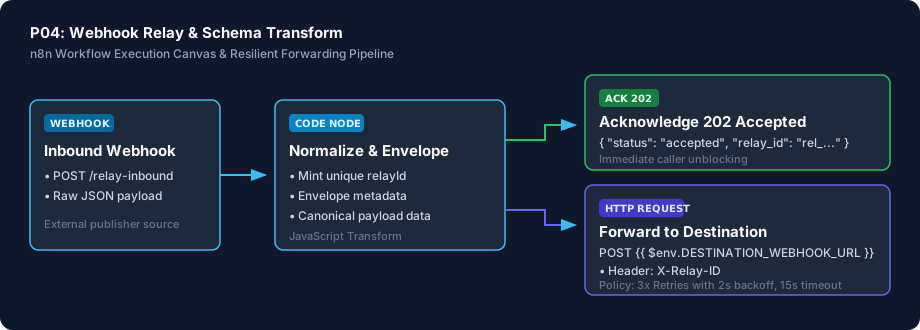
This workflow sits between your software services. When a service sends an update, this workflow accepts it immediately (so the sender doesn't time out), adds a tracking ID, formats the data cleanly, and attempts to deliver it to your destination tool. If the destination is temporarily unavailable, it automatically retries up to 3 times.
Provides a standardised forwarding step and another opportunity to deliver events after temporary failures, making integrations more reliable.
Technical Setup Guidance: Important durability disclosure: If the receiving service remains unreachable after all 3 retry attempts, this workflow does not store the event in a permanent backup database. It records the failure in your n8n log history for review.
Advanced. This is our most technical product. Setting it up requires understanding webhook endpoints, and we recommend working with a developer or technical specialist.
Every deliverable is clean, self-contained, and ready for immediate deployment. You receive the complete files, configuration templates, setup guides, and automated tests.
| File Name | Deliverable Description |
|---|---|
workflow.json | Ready-to-import n8n workflow canvas using official core nodes |
workflow_preview.svg | Visual architecture and execution pipeline diagram |
test_payload.json | Realistic inbound webhook payload test fixture |
.env.example | Configuration parameter template for destination URL |
SETUP.md | Quick setup and endpoint configuration guide |
CREDENTIALS.md | Header and security credential instructions |
COSTS.md | Transparent third-party fee disclosures |
LICENSING.md | Sanocea Commercial License & Author Verification |
tests/test_p04_workflow.py | Reproducible validation test suite |
For technical teams or developers assisting your business, below is the visual execution architecture and automated verification breakdown:
The workflow packet packaging, unique reference ID generation, and retry logic were tested and verified with sample data in local automated tests. Note: This workflow has not been imported or executed on a live, multi-tenant n8n production server.
Accepts incoming data immediately so the sending service does not time out.
Wraps raw incoming data in a consistent format with a unique tracking ID.
Attempts delivery up to 3 times with delays if the receiving service is temporarily busy.
Uses environment variables for destination settings without hardcoding secrets.
We believe in complete transparency. Review the documented technical boundaries and external service fee breakdown below prior to obtaining the package:
| Component | Estimated Cost | Details & Free Tier Allowances |
|---|---|---|
| Sanocea Workflow License | ₹0 / $0 | Full commercial rights for self-hosted execution |
| n8n Community Edition | ₹0 / Free | Free self-hosted on your existing server |
| Relay Processing Overhead | ₹0 / Free | Zero per-event fees; operates on your own compute |
| Destination Compute | Existing Plan | Receiving server resources only |
Receive the complete distributable archive containing workflow.json, step-by-step setup guides, mock fixtures, and automated test suites.
hello@sanocea.com. We issue packages with custom invoices within 1 business day.Checks whether your website is responding and whether its security certificate is approaching expiry, then sends an alert when a configured problem is detected.
Sends an order summary to a designated Telegram or Slack channel when a supported Shopify or WooCommerce order event arrives.
Receives supported form submissions, records valid lead information in Google Sheets and sends an acknowledgement email.
Reads an invoice CSV file, identifies invoices that meet configured overdue rules and prepares or sends reminders according to its escalation schedule and suppression rules.